西沙xisha
自然资源部 民政部关于公布我国南海部分岛礁和海底地理实体标准名称的公告
62325351 徐老师
吉林一号卫星
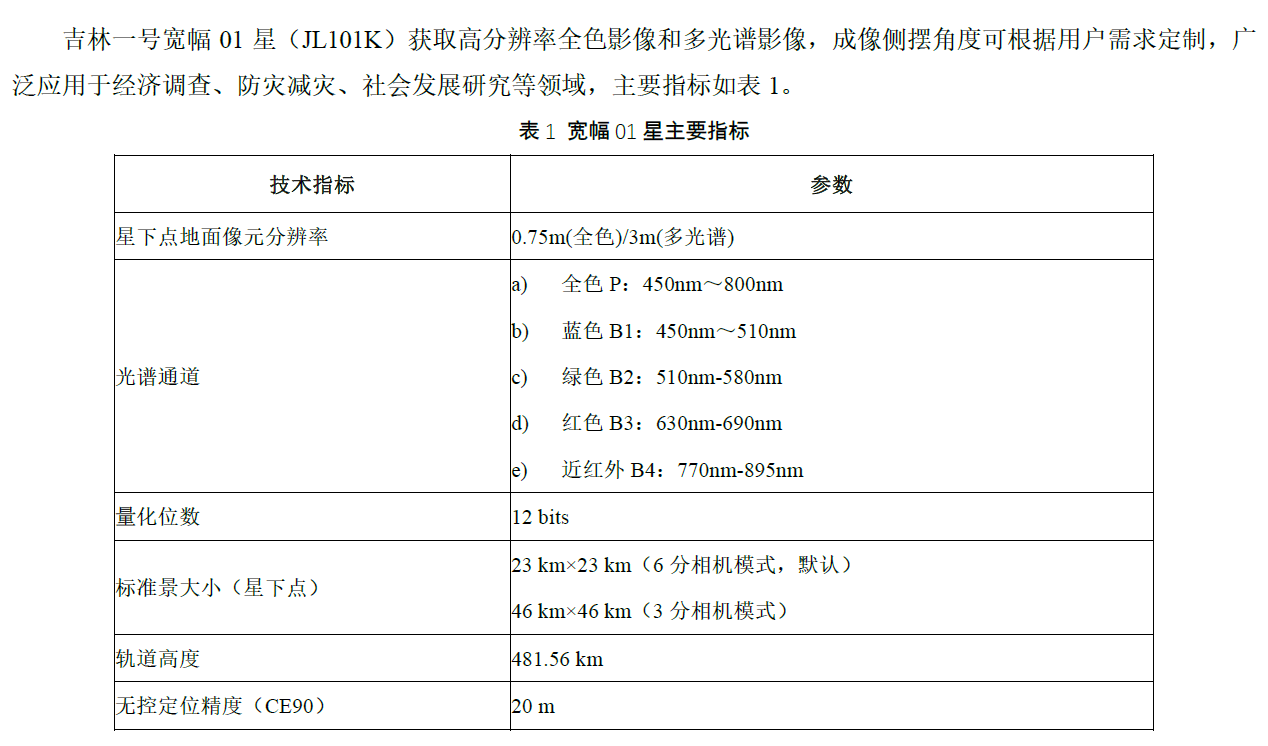
宽幅01A星
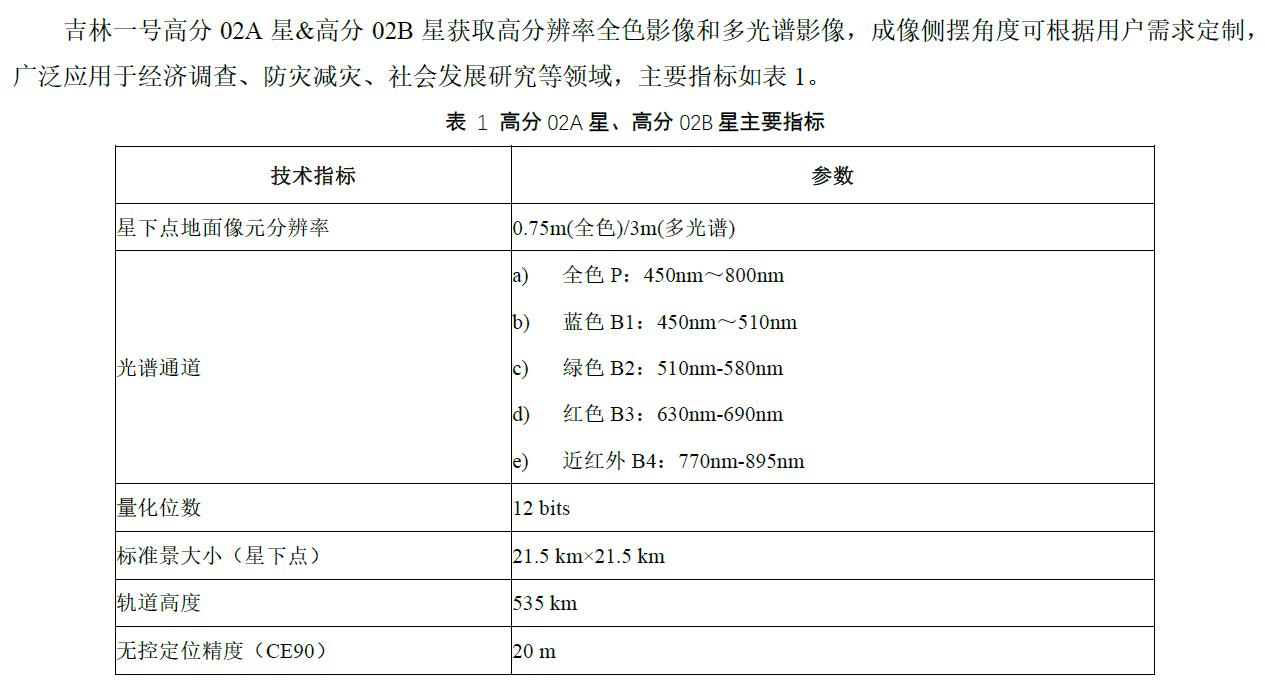
高分02A星
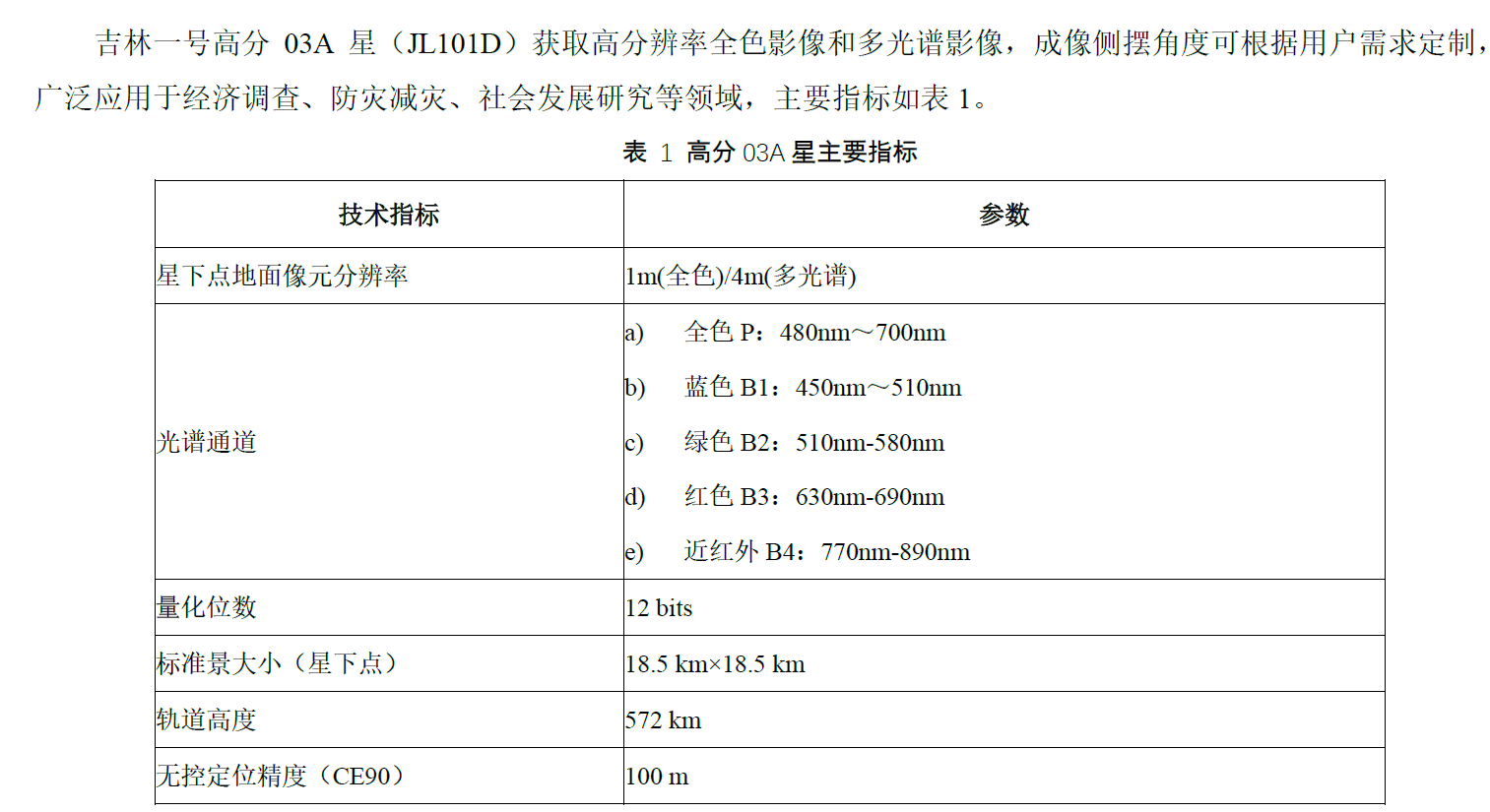
高分03A星
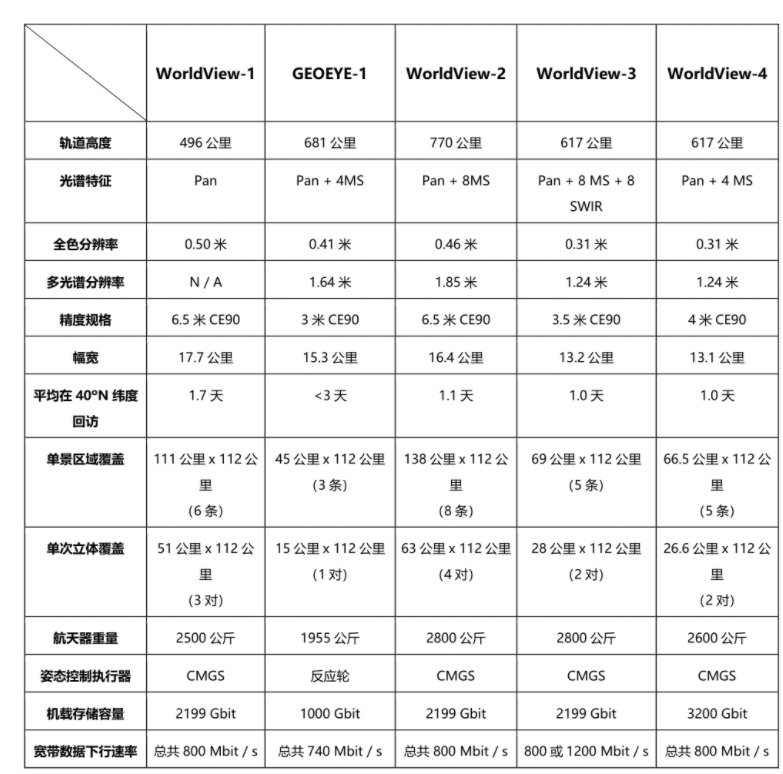
worldview
可见光近红外
利用遥感数据绘制的珊瑚礁特征和过程包括 ·p6:
- 珊瑚礁的覆盖范围
- 构成(底栖生物覆盖、栖息地特征等)
- 生物物理属性(水深、水质、海面温度等)
- 生物地球化学特征(初级生产物、钙化)
- 地质特征(地貌、沉积物多样性)
有关珊瑚礁遥感的研究沿着两个方向发展 p8:
- 针对水体和大气对遥感信号产生的影响,开发各种技术进行补偿
- 对珊瑚礁状态或功能更加深入展示的高级产品
| 岛屿名称 | 数据名称 | 问题备注 |
|---|---|---|
| 101_x永兴岛_x石岛 | yongxing2005_0119, 2012_0106 | |
| 102_x赵述岛 | zhaoshu2002_0731, | rgb,2010打不开 |
| 103_x东岛 | 20040301,20120205 | 错标为北岛 |
| 104_y晋卿岛 | yongle2005_2006, 2010_2011 | |
| 105_y金银岛 | yongle2005_2006, 2010_2011 | |
| 106_y羚羊礁 | yongle2005_2006, 2010_2011 | |
| 107_y甘泉岛 | yongle2005_2006, 2010_2011 | |
| 108_y珊瑚岛 | yongle2005_2006, 2010_2011 | |
| 109_y鸭公岛 | yongle2005_2006, 2010_2011 | |
| 110_y银屿 | yongle2005_2006, 2010_2011 | |
| 111_y琛航岛_广金岛 | yongle2005_2006, 2010_2011 | |
| 112_y中建岛 | zhongjian2005_0507, 2010_1228 | rgb |
| 201_x北岛 | zhaoshu2002_0731, | rgb,2010打不开 |
| 301_x西沙洲 | zhaoshu2002_0731, | rgb,2010打不开 |
| 302_x中岛 | zhaoshu2002_0731, | rgb,2010打不开 |
| 303_x南岛 | zhaoshu2002_0731, | rgb,2010打不开 |
| 304_x中沙洲 | zhaoshu2002_0731, | rgb,2010打不开 |
| 305_x南沙洲 | zhaoshu2002_0731, | rgb,2010打不开 |
| 306_x新西沙洲 | zhaoshu2002_0731, | rgb,2010打不开 |
| 307_x高尖石 | 没有数据 | |
| 308_x浪花礁 | 没有数据 | |
| 309_y北礁 | 没有数据 | |
| 310_y玉琢礁 | 没有数据 | |
| 311_y华光礁 | 没有数据 | |
| 312_y盘石屿 | 没有数据 | |
| 313_y全富岛 | yongle2005_2006, 2010_2011 | |
| 316_y石屿 | yongle2005_2006, 2010_2011 | |
2022年第一季度
├── 中建岛[112 中建岛]
│ └──中建岛20220219.tif [0.489x0.489]
├── 北岛 [103东岛]
│ └── 北岛20220201.tif
├── 永乐群岛[104晋卿岛,109鸭公岛,110银屿,111琛航岛_广金岛,313全富岛,316石屿]
│ ├── 永乐群岛20220127_20220208_20220217.tif [0.488x0.488]
│ ├── 永乐群岛202204补2022第一季度[105金银岛-106羚羊礁-107甘泉岛-108珊瑚岛]
│ │ ├── 永乐群岛202204.TIF [0.5x0.5]
├── 永兴岛[101永兴岛_石岛]
│ ├── 永兴岛20220201.tif [0.5x0.5]
└── 赵述岛[102,201,301,302,303,304,305,306,]
└── 赵述岛20220127_20220201.tif
缺少:307,308,309,310,311,312
2021年第四季度
├── 中建岛[112图像显示有问题]
│ ├── 中建岛_20211105.tif
├── 北岛 [103东岛]
│ ├── 北岛_20211208.tif
├── 永乐群岛[ 104晋卿岛,105金银岛,106羚羊礁,107甘泉岛,108珊瑚岛,109鸭公岛,110银屿,313全富岛,316石屿]
│ ├── 永乐群岛20211103.tif
├── 永兴岛 [101永兴岛石岛]
│ └── 永兴岛20211031.TIF
└── 赵述岛[102,201,301,302,303,304,305,306,] 云
└── 赵述岛20211031.TIF
缺少:307,308,309,310,311,312
2022年海南省重点研发项目
| 项目名称 | 申报人 | 项目类别 | 申报单位 |
| 基于无人机航测技术的海草床生态监控技术构建 | 陈春华 | 社会发展 | 海南省海洋与渔业科学院 |
| 热带地区森林火灾卫星遥感监测关键技术研究 | 蔡大鑫 | 社会发展 | 海南省气象科学研究所 |
| 海南岛热带森林生物量遥感估算方法及可持续发展指标监测与评估研究 | 颜为军 | 社会发展 | 海南省生态环境监测中心 |
| 橡胶树病虫害遥感监测与精准防控技术研究及示范 | 叶回春 | 现代农业 | 中国科学院空天信息研究院海南研究院 |
| 耦合多源信息的海南红树林遥感监测与碳储量估算研究 | 邹亚容 | 社会发展 | 海南卫星海洋应用研究院有限公司 |
| 自贸港建设背景下多源遥感城市环境建模与生态安全评价 | |||
| 基于深度学习和遥感云平台的珊瑚礁气候耦合响应研究 | |||
| 海岸带生态环境与可持续管理 | |||
- 中国近海海洋 海岛海岸带遥感影像处理与解译,蒋兴伟,2016,科学出版社,101.3
- 海岸带遥感评估,苏奋振,2015,科学出版社,132.2
- 海岸带生态环境变化遥感监测,陈劲松,2020,科学出版社,101.1
- 海洋卫星——蓝色家园的星空卫士,蒋兴伟,2021,科学出版社,57.2
中国海洋卫星
- 基于多源遥感的自贸港建设对海岸带生态影响研究
代码
yxd永兴岛
// Define parameters
var startDate = ee.Date('2020-01-01');
var endDate = startDate.advance(1, 'year');

var collection = ee.ImageCollection('LANDSAT/LC08/C02/T1_L2')
  .filter(ee.Filter.date(startDate, endDate))
  .filter(ee.Filter.bounds(yxd));

// Apply cloud mask
var maskL8sr = function(image) {
  var qaMask = image.select('QA_PIXEL')
    .bitwiseAnd(parseInt('11111', 2)).eq(0);
  var saturationMask = image.select('QA_RADSAT').eq(0);

  // Apply the scaling factors to the appropriate bands.
  var opticalBands = image.select('SR_B.')
    .multiply(0.0000275).add(-0.2);
  var thermalBands = image.select('ST_B.*')
    .multiply(0.00341802).add(149.0);

  // Replace the original bands with the scaled ones
  // and apply the masks.
  return image.addBands(opticalBands, null, true)
      .addBands(thermalBands, null, true)
      .updateMask(qaMask)
      .updateMask(saturationMask);
};
var collection = collection.map(maskL8sr);

// Select and Rename Bands
var collection = collection.select(
  ['SR_B2', 'SR_B3', 'SR_B4', 'SR_B5', 'SR_B6', 'SR_B7'],
  ['blue',  'green', 'red',   'nir',   'swir1', 'swir2']
);

// Create a median composite and clip
var composite = collection.median().clip(yxd);

// 2.###################################################

var rgbVis = {
  bands: ['red', 'green', 'blue'],
  min: 0.0,
  max: 0.3
};
Map.addLayer(composite, rgbVis, 'Composite Image');


// Code to compute AWEI and detect water
// using Otsu thresholding
var detectWater = function(image) {
  var awei = image.expression(
    '4 * (GREEN - SWIR1) - (0.25 * NIR + 2.75 * SWIR2)', {
      'GREEN': image.select('green'),
      'NIR': image.select('nir'),
      'SWIR1': image.select('swir1'),
      'SWIR2': image.select('swir2'),
  }).rename('awei');

  // Otsu Thresholding
  var thresholding = require(
    'users/gena/packages:thresholding');
  var scale = 100;
  var bounds = yxd;
  var cannyThreshold = 0.7;
  var cannySigma = 1;
  var minValue = -0.2;
  var th = thresholding.computeThresholdUsingOtsu(
    awei, scale, bounds,
    cannyThreshold, cannySigma, minValue);
  // Create a Land-Water Image using Otsu Threshold
  // You can replace th with a manual threshold if
  // Otsu results are not satisfactory
  var water = awei.gt(th).rename('water');

  return water;
};
var water = detectWater(composite);
var waterVis = {min:0, max:1, palette: ['white', 'blue']};
Map.addLayer(water, waterVis, 'All Water');

//3.###################################################
// Export resolution in meters is at which the coastline will
// be vectorized.
// Higher resolution (such as 10) will give smooother results
var exportResolutionMeters = 30;

// We need a threshold in meters to remove inland waterbodies
// and coastal islands. If you have a large waterbody close
// to the coastline, set this higher.
var waterbodySizeMeters = 2000; //2000
var islandSizeMeters = 1000;    //1000

// This function takes a binary Land-Water image and
// removes inland water and small islands
function removeInlandWaterAndIslands(waterImage) {
  // reduceConnectedComponents expects an interger image
  waterImage = waterImage.int();

  // Define neighborhood based on user parameters
  var connectedPixelsLand = ee.Number(waterbodySizeMeters)
    .divide(exportResolutionMeters).int();

  var connectedPixelsWater = ee.Number(islandSizeMeters)
    .divide(exportResolutionMeters).int();

  // Remove inland water
  var landFilled = waterImage.addBands(waterImage)
   .reduceConnectedComponents(
     ee.Reducer.median(), 'water', connectedPixelsLand)
   .unmask(99).eq(99).and(waterImage.neq(0));

  // Remove small islands
  var waterFilled = landFilled.addBands(landFilled)
    .reduceConnectedComponents(
      ee.Reducer.median(), 'water_1', connectedPixelsWater)
    .unmask(99).eq(99).and(landFilled.neq(1));

  // Land-Water Boundary
  return waterFilled;
}
var landWaterBoundary = removeInlandWaterAndIslands(water);
var landWaterBoundaryVis = {
  min:0,
  max:1,
  palette: ['blue', 'white']
};

Map.addLayer(landWaterBoundary, landWaterBoundaryVis,
  'Land-Water Boundary (Raster)');

//4.###################################################
// Convert the coastline image to vector

var vectors = ee.Image(landWaterBoundary).selfMask()
  .reduceToVectors({
    geometry: yxd,
    scale: exportResolutionMeters,
    eightConnected: true,
    maxPixels: 1e8,
    tileScale: 16
  });
/*
  var vectors = binaryImage.reduceToVectors({
  geometryType: 'polygon',
  scale: 500, // 分辨率(单位:米),可根据需要调整
  maxPixels: 1e8
});
*/

Map.addLayer(vectors, {color: 'blue'},'Land-Water Boundary (Vector)');

//5.###################################################
// This function takes vectorized polygons and
// extracts a polyline
var simplifyAndExtractCoastline = function(vectors){
  // Simplify vectors
  var processedVectors = vectors.map(function(f) {
    var coords = f.geometry()
      .simplify({maxError: exportResolutionMeters})
      .coordinates();

    // Buffer the geometry by a pixel to avoid rasterizing
    // the boundary polygon
    var bufferDistance = ee.Number(
      exportResolutionMeters).multiply(-1);
    return f
      .setGeometry(
        ee.Geometry.MultiLineString(coords)
          .intersection(yxd.buffer(bufferDistance)));
  });
  return processedVectors;
};

var coastlineVector = simplifyAndExtractCoastline(
    vectors);
Map.addLayer(coastlineVector, {color: 'red'},
  'Coastline (Vector)');
//6.###################################################
// Exports
// Exports can run for longer time and have more resources
// If any of your layers time-out or give tile errors,
// Run the exports instead
Export.table.toDrive({
  collection: coastlineVector,
  description: 'Extracted_Coastline_Vector',
  folder: 'earthengine',
  fileNamePrefix: 'coastline',
  fileFormat: 'SHP'})
Export.image.toDrive({
  image: landWaterBoundary,
  description: 'Extracted_Land_Water_boundary_Raster',
  folder: 'earthengine',
  fileNamePrefix: 'land_water_boundary_raster',
  region: yxd,
  scale: exportResolutionMeters,
  maxPixels: 1e10})

Export.image.toDrive({
  image: composite,
  description: 'Composite',
  folder: 'earthengine',
  fileNamePrefix: 'composite',
  region: yxd,
  scale: exportResolutionMeters,
  maxPixels: 1e10})
zsd赵述岛
// Define parameters
var startDate = ee.Date('2022-01-01');
var endDate = startDate.advance(1, 'year'); // 16 months for 2013

var collection = ee.ImageCollection('LANDSAT/LC08/C02/T1_L2')
  .filter(ee.Filter.date(startDate, endDate))
  .filter(ee.Filter.bounds(zhaoshudao));

// Apply cloud mask
var maskL8sr = function(image) {
  var qaMask = image.select('QA_PIXEL')
    .bitwiseAnd(parseInt('11111', 2)).eq(0);
  var saturationMask = image.select('QA_RADSAT').eq(0);

  // Apply the scaling factors to the appropriate bands.
  var opticalBands = image.select('SR_B.')
    .multiply(0.0000275).add(-0.2);
  var thermalBands = image.select('ST_B.*')
    .multiply(0.00341802).add(149.0);

  // Replace the original bands with the scaled ones
  // and apply the masks.
  return image.addBands(opticalBands, null, true)
      .addBands(thermalBands, null, true)
      .updateMask(qaMask)
      .updateMask(saturationMask);
};
var collection = collection.map(maskL8sr);

// Select and Rename Bands
var collection = collection.select(
  ['SR_B2', 'SR_B3', 'SR_B4', 'SR_B5', 'SR_B6', 'SR_B7'],
  ['blue',  'green', 'red',   'nir',   'swir1', 'swir2']
);

// Create a median composite and clip
var composite = collection.median().clip(zhaoshudao);

// 2.###################################################

var rgbVis = {
  bands: ['red', 'green', 'blue'],
  min: 0.0,
  max: 0.3
};
Map.centerObject(composite,15);
Map.addLayer(composite, rgbVis, 'Composite Image');


// Code to compute AWEI and detect water
// using Otsu thresholding
var detectWater = function(image) {
  var awei = image.expression(
    '4 * (GREEN - SWIR1) - (0.25 * NIR + 2.75 * SWIR2)', {
      'GREEN': image.select('green'),
      'NIR': image.select('nir'),
      'SWIR1': image.select('swir1'),
      'SWIR2': image.select('swir2'),
  }).rename('awei');

  // Otsu Thresholding
  var thresholding = require(
    'users/gena/packages:thresholding');
  var scale = 100;
  var bounds = zhaoshudao;
  var cannyThreshold = 0.7;
  var cannySigma = 1;
  var minValue = -0.2;
  var th = thresholding.computeThresholdUsingOtsu(
    awei, scale, bounds,
    cannyThreshold, cannySigma, minValue);
  // Create a Land-Water Image using Otsu Threshold
  // You can replace th with a manual threshold if
  // Otsu results are not satisfactory
  var water = awei.gt(th).rename('water');

  return water;
};
var water = detectWater(composite);
var waterVis = {min:0, max:1, palette: ['white', 'blue']};
Map.addLayer(water, waterVis, 'All Water');

//3.###################################################
// Export resolution in meters is at which the coastline will
// be vectorized.
// Higher resolution (such as 10) will give smooother results
var exportResolutionMeters = 30;

// We need a threshold in meters to remove inland waterbodies
// and coastal islands. If you have a large waterbody close
// to the coastline, set this higher.
var waterbodySizeMeters = 500; //2000
var islandSizeMeters = 100;    //1000

// This function takes a binary Land-Water image and
// removes inland water and small islands
function removeInlandWaterAndIslands(waterImage) {
  // reduceConnectedComponents expects an interger image
  waterImage = waterImage.int();

  // Define neighborhood based on user parameters
  var connectedPixelsLand = ee.Number(waterbodySizeMeters)
    .divide(exportResolutionMeters).int();

  var connectedPixelsWater = ee.Number(islandSizeMeters)
    .divide(exportResolutionMeters).int();

  // Remove inland water
  var landFilled = waterImage.addBands(waterImage)
   .reduceConnectedComponents(
     ee.Reducer.median(), 'water', connectedPixelsLand)
   .unmask(99).eq(99).and(waterImage.neq(0));

  // Remove small islands
  var waterFilled = landFilled.addBands(landFilled)
    .reduceConnectedComponents(
      ee.Reducer.median(), 'water_1', connectedPixelsWater)
    .unmask(99).eq(99).and(landFilled.neq(1));

  // Land-Water Boundary
  return waterFilled;
}
var landWaterBoundary = removeInlandWaterAndIslands(water);
var landWaterBoundaryVis = {
  min:0,
  max:1,
  palette: ['blue', 'white']
};

Map.addLayer(landWaterBoundary, landWaterBoundaryVis,
  'Land-Water Boundary (Raster)');

//4.###################################################
// Convert the coastline image to vector

var vectors = ee.Image(landWaterBoundary).selfMask()
  .reduceToVectors({
    geometry: zhaoshudao,
    scale: exportResolutionMeters,
    eightConnected: true,
    maxPixels: 1e8,
    tileScale: 16
  });

Map.addLayer(vectors, {color: 'blue'},'Land-Water Boundary (Vector)');

//5.###################################################
// This function takes vectorized polygons and
// extracts a polyline
var simplifyAndExtractCoastline = function(vectors){
  // Simplify vectors
  var processedVectors = vectors.map(function(f) {
    var coords = f.geometry()
      .simplify({maxError: exportResolutionMeters})
      .coordinates();

    // Buffer the geometry by a pixel to avoid rasterizing
    // the boundary polygon
    var bufferDistance = ee.Number(
      exportResolutionMeters).multiply(-1);
    return f
      .setGeometry(
        ee.Geometry.MultiLineString(coords)
          .intersection(zhaoshudao.buffer(bufferDistance)));
  });
  return processedVectors;
};

var coastlineVector = simplifyAndExtractCoastline(
    vectors);
Map.addLayer(coastlineVector, {color: 'red'},
  'Coastline (Vector)');

//6.###################################################
// Exports
// Exports can run for longer time and have more resources
// If any of your layers time-out or give tile errors,
// Run the exports instead
Export.table.toDrive({
  collection: coastlineVector,
  description: 'Extracted_Coastline_Vector',
  folder: 'earthengine',
  fileNamePrefix: 'coastline',
  fileFormat: 'SHP'})

Export.image.toDrive({
  image: landWaterBoundary,
  description: 'Extracted_Land_Water_boundary_Raster',
  folder: 'earthengine',
  fileNamePrefix: 'land_water_boundary_raster',
  region: zhaoshudao,
  scale: exportResolutionMeters,
  maxPixels: 1e10})

Export.image.toDrive({
  image: composite,
  description: 'Composite',
  folder: 'earthengine',
  fileNamePrefix: 'composite',
  region: zhaoshudao,
  scale: exportResolutionMeters,
  maxPixels: 1e10})
xsz西沙洲
// Define parameters
var startDate = ee.Date('2013-01-01');
var endDate = startDate.advance(18, 'month'); //18, 'month' for 2013

var collection = ee.ImageCollection('LANDSAT/LC08/C02/T1_L2')
  .filter(ee.Filter.date(startDate, endDate))
  .filter(ee.Filter.bounds(xishazhou));

// Apply cloud mask
var maskL8sr = function(image) {
  var qaMask = image.select('QA_PIXEL')
    .bitwiseAnd(parseInt('11111', 2)).eq(0);
  var saturationMask = image.select('QA_RADSAT').eq(0);

// Apply the scaling factors to the appropriate bands.
  var opticalBands = image.select('SR_B.')
    .multiply(0.0000275).add(-0.2);
  var thermalBands = image.select('ST_B.*')
    .multiply(0.00341802).add(149.0);

// Replace the original bands with the scaled ones
// and apply the masks.
  return image.addBands(opticalBands, null, true)
      .addBands(thermalBands, null, true)
      .updateMask(qaMask)
      .updateMask(saturationMask);
};
var collection = collection.map(maskL8sr);

// Select and Rename Bands
var collection = collection.select(
  ['SR_B2', 'SR_B3', 'SR_B4', 'SR_B5', 'SR_B6', 'SR_B7'],
  ['blue',  'green', 'red',   'nir',   'swir1', 'swir2']
);

// Create a median composite and clip
var composite = collection.median().clip(xishazhou);
Map.centerObject(composite,15);

// 2.###################################################

var rgbVis = {
  bands: ['red', 'green', 'blue'],
  min: 0.0,
  max: 0.3
};
Map.addLayer(composite, rgbVis, 'Composite Image');


// Code to compute AWEI and detect water
// using Otsu thresholding
var detectWater = function(image) {
  var awei = image.expression(
    '4 * (GREEN - SWIR1) - (0.25 * NIR + 2.75 * SWIR2)', {
      'GREEN': image.select('green'),
      'NIR': image.select('nir'),
      'SWIR1': image.select('swir1'),
      'SWIR2': image.select('swir2'),
  }).rename('awei');

  // Otsu Thresholding
  var thresholding = require(
    'users/gena/packages:thresholding');
  var scale = 100;
  var bounds = xishazhou;
  var cannyThreshold = 0.7;
  var cannySigma = 1;
  var minValue = -0.2;
  var th = thresholding.computeThresholdUsingOtsu(
    awei, scale, bounds,
    cannyThreshold, cannySigma, minValue);
  // Create a Land-Water Image using Otsu Threshold
  // You can replace th with a manual threshold if
  // Otsu results are not satisfactory
  var water = awei.gt(th).rename('water');

  return water;
};
var water = detectWater(composite);
var waterVis = {min:0, max:1, palette: ['white', 'blue']};
Map.addLayer(water, waterVis, 'All Water');

//3.###################################################
// Export resolution in meters is at which the coastline will
// be vectorized.
// Higher resolution (such as 10) will give smooother results
var exportResolutionMeters = 30;

// We need a threshold in meters to remove inland waterbodies
// and coastal islands. If you have a large waterbody close
// to the coastline, set this higher.
var waterbodySizeMeters = 500; //2000
var islandSizeMeters = 100;    //1000

// This function takes a binary Land-Water image and
// removes inland water and small islands
function removeInlandWaterAndIslands(waterImage) {
  // reduceConnectedComponents expects an interger image
  waterImage = waterImage.int();

  // Define neighborhood based on user parameters
  var connectedPixelsLand = ee.Number(waterbodySizeMeters)
    .divide(exportResolutionMeters).int();

  var connectedPixelsWater = ee.Number(islandSizeMeters)
    .divide(exportResolutionMeters).int();

  // Remove inland water
  var landFilled = waterImage.addBands(waterImage)
   .reduceConnectedComponents(
     ee.Reducer.median(), 'water', connectedPixelsLand)
   .unmask(99).eq(99).and(waterImage.neq(0));

  // Remove small islands
  var waterFilled = landFilled.addBands(landFilled)
    .reduceConnectedComponents(
      ee.Reducer.median(), 'water_1', connectedPixelsWater)
    .unmask(99).eq(99).and(landFilled.neq(1));

  // Land-Water Boundary
  return waterFilled;
}
var landWaterBoundary = removeInlandWaterAndIslands(water);
var landWaterBoundaryVis = {
  min:0,
  max:1,
  palette: ['blue', 'white']
};

Map.addLayer(landWaterBoundary, landWaterBoundaryVis,
  'Land-Water Boundary (Raster)');

//4.###################################################
// Convert the coastline image to vector

var vectors = ee.Image(landWaterBoundary).selfMask()
  .reduceToVectors({
    geometry: xishazhou,
    scale: exportResolutionMeters,
    eightConnected: true,
    maxPixels: 1e8,
    tileScale: 16
  });

Map.addLayer(vectors, {color: 'blue'},'Land-Water Boundary (Vector)');

//5.###################################################
// This function takes vectorized polygons and
// extracts a polyline
var simplifyAndExtractCoastline = function(vectors){
  // Simplify vectors
  var processedVectors = vectors.map(function(f) {
    var coords = f.geometry()
      .simplify({maxError: exportResolutionMeters})
      .coordinates();

    // Buffer the geometry by a pixel to avoid rasterizing
    // the boundary polygon
    var bufferDistance = ee.Number(
      exportResolutionMeters).multiply(-1);
    return f
      .setGeometry(
        ee.Geometry.MultiLineString(coords)
          .intersection(xishazhou.buffer(bufferDistance)));
  });
  return processedVectors;
};

var coastlineVector = simplifyAndExtractCoastline(
    vectors);
Map.addLayer(coastlineVector, {color: 'red'},
  'Coastline (Vector)');

//6.###################################################
// Exports
// Exports can run for longer time and have more resources
// If any of your layers time-out or give tile errors,
// Run the exports instead
Export.table.toDrive({
  collection: coastlineVector,
  description: 'Extracted_Coastline_Vector',
  folder: 'earthengine',
  fileNamePrefix: 'coastline',
  fileFormat: 'SHP'})

Export.image.toDrive({
  image: landWaterBoundary,
  description: 'Extracted_Land_Water_boundary_Raster',
  folder: 'earthengine',
  fileNamePrefix: 'land_water_boundary_raster',
  region: xishazhou,
  scale: exportResolutionMeters,
  maxPixels: 1e10})

Export.image.toDrive({
  image: composite,
  description: 'Composite',
  folder: 'earthengine',
  fileNamePrefix: 'composite',
  region: xishazhou,
  scale: exportResolutionMeters,
  maxPixels: 1e10})
bd北岛
// Define parameters
var startDate = ee.Date('2023-01-01');
var endDate = startDate.advance(1, 'year');

var collection = ee.ImageCollection('LANDSAT/LC08/C02/T1_L2')
  .filter(ee.Filter.date(startDate, endDate))
  .filter(ee.Filter.bounds(beidao));

// Apply cloud mask
var maskL8sr = function(image) {
  var qaMask = image.select('QA_PIXEL')
    .bitwiseAnd(parseInt('11111', 2)).eq(0);
  var saturationMask = image.select('QA_RADSAT').eq(0);

// Apply the scaling factors to the appropriate bands.
  var opticalBands = image.select('SR_B.')
    .multiply(0.0000275).add(-0.2);
  var thermalBands = image.select('ST_B.*')
    .multiply(0.00341802).add(149.0);

// Replace the original bands with the scaled ones
// and apply the masks.
  return image.addBands(opticalBands, null, true)
      .addBands(thermalBands, null, true)
      .updateMask(qaMask)
      .updateMask(saturationMask);
};
var collection = collection.map(maskL8sr);

// Select and Rename Bands
var collection = collection.select(
  ['SR_B2', 'SR_B3', 'SR_B4', 'SR_B5', 'SR_B6', 'SR_B7'],
  ['blue',  'green', 'red',   'nir',   'swir1', 'swir2']
);

// Create a median composite and clip
var composite = collection.median().clip(beidao);
Map.centerObject(composite,15);

// 2.###################################################

var rgbVis = {
  bands: ['red', 'green', 'blue'],
  min: 0.0,
  max: 0.3
};
Map.addLayer(composite, rgbVis, 'Composite Image');


// Code to compute AWEI and detect water
// using Otsu thresholding
var detectWater = function(image) {
  var awei = image.expression(
    '4 * (GREEN - SWIR1) - (0.25 * NIR + 2.75 * SWIR2)', {
      'GREEN': image.select('green'),
      'NIR': image.select('nir'),
      'SWIR1': image.select('swir1'),
      'SWIR2': image.select('swir2'),
  }).rename('awei');

  // Otsu Thresholding
  var thresholding = require(
    'users/gena/packages:thresholding');
  var scale = 100;
  var bounds = beidao;
  var cannyThreshold = 0.7;
  var cannySigma = 1;
  var minValue = -0.2;
  var th = thresholding.computeThresholdUsingOtsu(
    awei, scale, bounds,
    cannyThreshold, cannySigma, minValue);
  // Create a Land-Water Image using Otsu Threshold
  // You can replace th with a manual threshold if
  // Otsu results are not satisfactory
  var water = awei.gt(th).rename('water');

  return water;
};
var water = detectWater(composite);
var waterVis = {min:0, max:1, palette: ['white', 'blue']};
Map.addLayer(water, waterVis, 'All Water');

//3.###################################################
// Export resolution in meters is at which the coastline will
// be vectorized.
// Higher resolution (such as 10) will give smooother results
var exportResolutionMeters = 30;

// We need a threshold in meters to remove inland waterbodies
// and coastal islands. If you have a large waterbody close
// to the coastline, set this higher.
var waterbodySizeMeters = 2000; //2000
var islandSizeMeters = 500;    //1000

// This function takes a binary Land-Water image and
// removes inland water and small islands
function removeInlandWaterAndIslands(waterImage) {
  // reduceConnectedComponents expects an interger image
  waterImage = waterImage.int();

  // Define neighborhood based on user parameters
  var connectedPixelsLand = ee.Number(waterbodySizeMeters)
    .divide(exportResolutionMeters).int();

  var connectedPixelsWater = ee.Number(islandSizeMeters)
    .divide(exportResolutionMeters).int();

  // Remove inland water
  var landFilled = waterImage.addBands(waterImage)
   .reduceConnectedComponents(
     ee.Reducer.median(), 'water', connectedPixelsLand)
   .unmask(99).eq(99).and(waterImage.neq(0));

  // Remove small islands
  var waterFilled = landFilled.addBands(landFilled)
    .reduceConnectedComponents(
      ee.Reducer.median(), 'water_1', connectedPixelsWater)
    .unmask(99).eq(99).and(landFilled.neq(1));

  // Land-Water Boundary
  return waterFilled;
}
var landWaterBoundary = removeInlandWaterAndIslands(water);
var landWaterBoundaryVis = {
  min:0,
  max:1,
  palette: ['blue', 'white']
};

Map.addLayer(landWaterBoundary, landWaterBoundaryVis,
  'Land-Water Boundary (Raster)');

//4.###################################################
// Convert the coastline image to vector

var vectors = ee.Image(landWaterBoundary).selfMask()
  .reduceToVectors({
    geometry: beidao,
    scale: exportResolutionMeters,
    eightConnected: true,
    maxPixels: 1e8,
    tileScale: 16
  });

Map.addLayer(vectors, {color: 'blue'},'Land-Water Boundary (Vector)');

//5.###################################################
// This function takes vectorized polygons and
// extracts a polyline
var simplifyAndExtractCoastline = function(vectors){
  // Simplify vectors
  var processedVectors = vectors.map(function(f) {
    var coords = f.geometry()
      .simplify({maxError: exportResolutionMeters})
      .coordinates();

    // Buffer the geometry by a pixel to avoid rasterizing
    // the boundary polygon
    var bufferDistance = ee.Number(
      exportResolutionMeters).multiply(-1);
    return f
      .setGeometry(
        ee.Geometry.MultiLineString(coords)
          .intersection(beidao.buffer(bufferDistance)));
  });
  return processedVectors;
};

var coastlineVector = simplifyAndExtractCoastline(
    vectors);
Map.addLayer(coastlineVector, {color: 'red'},
  'Coastline (Vector)');

//6.###################################################
// Exports
// Exports can run for longer time and have more resources
// If any of your layers time-out or give tile errors,
// Run the exports instead
Export.table.toDrive({
  collection: coastlineVector,
  description: 'Extracted_Coastline_Vector',
  folder: 'earthengine',
  fileNamePrefix: 'coastline',
  fileFormat: 'SHP'})

Export.image.toDrive({
  image: landWaterBoundary,
  description: 'Extracted_Land_Water_boundary_Raster',
  folder: 'earthengine',
  fileNamePrefix: 'land_water_boundary_raster',
  region: beidao,
  scale: exportResolutionMeters,
  maxPixels: 1e10})

Export.image.toDrive({
  image: composite,
  description: 'Composite',
  folder: 'earthengine',
  fileNamePrefix: 'composite',
  region: beidao,
  scale: exportResolutionMeters,
  maxPixels: 1e10})
zd中岛
// Define parameters
var startDate = ee.Date('2013-01-01');
var endDate = startDate.advance(18, 'months');

var collection = ee.ImageCollection('LANDSAT/LC08/C02/T1_L2')
  .filter(ee.Filter.date(startDate, endDate))
  .filter(ee.Filter.bounds(zhongdao));

// Apply cloud mask
var maskL8sr = function(image) {
  var qaMask = image.select('QA_PIXEL')
    .bitwiseAnd(parseInt('11111', 2)).eq(0);
  var saturationMask = image.select('QA_RADSAT').eq(0);

// Apply the scaling factors to the appropriate bands.
  var opticalBands = image.select('SR_B.')
    .multiply(0.0000275).add(-0.2);
  var thermalBands = image.select('ST_B.*')
    .multiply(0.00341802).add(149.0);

// Replace the original bands with the scaled ones
// and apply the masks.
  return image.addBands(opticalBands, null, true)
      .addBands(thermalBands, null, true)
      .updateMask(qaMask)
      .updateMask(saturationMask);
};
var collection = collection.map(maskL8sr);

// Select and Rename Bands
var collection = collection.select(
  ['SR_B2', 'SR_B3', 'SR_B4', 'SR_B5', 'SR_B6', 'SR_B7'],
  ['blue',  'green', 'red',   'nir',   'swir1', 'swir2']
);

// Create a median composite and clip
var composite = collection.median().clip(zhongdao);
Map.centerObject(composite,15);

// 2.###################################################

var rgbVis = {
  bands: ['red', 'green', 'blue'],
  min: 0.0,
  max: 0.3
};
Map.addLayer(composite, rgbVis, 'Composite Image');


// Code to compute AWEI and detect water
// using Otsu thresholding
var detectWater = function(image) {
  var awei = image.expression(
    '4 * (GREEN - SWIR1) - (0.25 * NIR + 2.75 * SWIR2)', {
      'GREEN': image.select('green'),
      'NIR': image.select('nir'),
      'SWIR1': image.select('swir1'),
      'SWIR2': image.select('swir2'),
  }).rename('awei');

  // Otsu Thresholding
  var thresholding = require(
    'users/gena/packages:thresholding');
  var scale = 100;
  var bounds = zhongdao;
  var cannyThreshold = 0.7;
  var cannySigma = 1;
  var minValue = -0.2;
  var th = thresholding.computeThresholdUsingOtsu(
    awei, scale, bounds,
    cannyThreshold, cannySigma, minValue);
  // Create a Land-Water Image using Otsu Threshold
  // You can replace th with a manual threshold if
  // Otsu results are not satisfactory
  var water = awei.gt(th).rename('water');

  return water;
};
var water = detectWater(composite);
var waterVis = {min:0, max:1, palette: ['white', 'blue']};
Map.addLayer(water, waterVis, 'All Water');

//3.###################################################
// Export resolution in meters is at which the coastline will
// be vectorized.
// Higher resolution (such as 10) will give smooother results
var exportResolutionMeters = 30;

// We need a threshold in meters to remove inland waterbodies
// and coastal islands. If you have a large waterbody close
// to the coastline, set this higher.
var waterbodySizeMeters = 1000; //2000
var islandSizeMeters = 50;    //1000

// This function takes a binary Land-Water image and
// removes inland water and small islands
function removeInlandWaterAndIslands(waterImage) {
  // reduceConnectedComponents expects an interger image
  waterImage = waterImage.int();

  // Define neighborhood based on user parameters
  var connectedPixelsLand = ee.Number(waterbodySizeMeters)
    .divide(exportResolutionMeters).int();

  var connectedPixelsWater = ee.Number(islandSizeMeters)
    .divide(exportResolutionMeters).int();

  // Remove inland water
  var landFilled = waterImage.addBands(waterImage)
   .reduceConnectedComponents(
     ee.Reducer.median(), 'water', connectedPixelsLand)
   .unmask(99).eq(99).and(waterImage.neq(0));

  // Remove small islands
  var waterFilled = landFilled.addBands(landFilled)
    .reduceConnectedComponents(
      ee.Reducer.median(), 'water_1', connectedPixelsWater)
    .unmask(99).eq(99).and(landFilled.neq(1));

  // Land-Water Boundary
  return waterFilled;
}
var landWaterBoundary = removeInlandWaterAndIslands(water);
var landWaterBoundaryVis = {
  min:0,
  max:1,
  palette: ['blue', 'white']
};

Map.addLayer(landWaterBoundary, landWaterBoundaryVis,
  'Land-Water Boundary (Raster)');

//4.###################################################
// Convert the coastline image to vector

var vectors = ee.Image(landWaterBoundary).selfMask()
  .reduceToVectors({
    geometry: zhongdao,
    scale: exportResolutionMeters,
    eightConnected: true,
    maxPixels: 1e8,
    tileScale: 16
  });

Map.addLayer(vectors, {color: 'blue'},'Land-Water Boundary (Vector)');

//5.###################################################
// This function takes vectorized polygons and
// extracts a polyline
var simplifyAndExtractCoastline = function(vectors){
  // Simplify vectors
  var processedVectors = vectors.map(function(f) {
    var coords = f.geometry()
      .simplify({maxError: exportResolutionMeters})
      .coordinates();

    // Buffer the geometry by a pixel to avoid rasterizing
    // the boundary polygon
    var bufferDistance = ee.Number(
      exportResolutionMeters).multiply(-1);
    return f
      .setGeometry(
        ee.Geometry.MultiLineString(coords)
          .intersection(zhongdao.buffer(bufferDistance)));
  });
  return processedVectors;
};

var coastlineVector = simplifyAndExtractCoastline(
    vectors);
Map.addLayer(coastlineVector, {color: 'red'},
  'Coastline (Vector)');

//6.###################################################
// Exports
// Exports can run for longer time and have more resources
// If any of your layers time-out or give tile errors,
// Run the exports instead
Export.table.toDrive({
  collection: coastlineVector,
  description: 'Extracted_Coastline_Vector',
  folder: 'earthengine',
  fileNamePrefix: 'coastline',
  fileFormat: 'SHP'})

Export.image.toDrive({
  image: landWaterBoundary,
  description: 'Extracted_Land_Water_boundary_Raster',
  folder: 'earthengine',
  fileNamePrefix: 'land_water_boundary_raster',
  region: zhongdao,
  scale: exportResolutionMeters,
  maxPixels: 1e10})

Export.image.toDrive({
  image: composite,
  description: 'Composite',
  folder: 'earthengine',
  fileNamePrefix: 'composite',
  region: zhongdao,
  scale: exportResolutionMeters,
  maxPixels: 1e10})
nd南岛
南岛2013年参数
// Define parameters
var startDate = ee.Date('2023-01-01');
var endDate = startDate.advance(1, 'year');

var collection = ee.ImageCollection('LANDSAT/LC08/C02/T1_L2')
  .filter(ee.Filter.date(startDate, endDate))
  .filter(ee.Filter.bounds(nandao));

// Apply cloud mask
var maskL8sr = function(image) {
  var qaMask = image.select('QA_PIXEL')
    .bitwiseAnd(parseInt('11111', 2)).eq(0);
  var saturationMask = image.select('QA_RADSAT').eq(0);

// Apply the scaling factors to the appropriate bands.
  var opticalBands = image.select('SR_B.')
    .multiply(0.0000275).add(-0.2);
  var thermalBands = image.select('ST_B.*')
    .multiply(0.00341802).add(149.0);

// Replace the original bands with the scaled ones
// and apply the masks.
  return image.addBands(opticalBands, null, true)
      .addBands(thermalBands, null, true)
      .updateMask(qaMask)
      .updateMask(saturationMask);
};
var collection = collection.map(maskL8sr);

// Select and Rename Bands
var collection = collection.select(
  ['SR_B2', 'SR_B3', 'SR_B4', 'SR_B5', 'SR_B6', 'SR_B7'],
  ['blue',  'green', 'red',   'nir',   'swir1', 'swir2']
);

// Create a median composite and clip
var composite = collection.median().clip(nandao);
Map.centerObject(composite,15);

// 2.###################################################
var rgbVis = {
  bands: ['red', 'green', 'blue'],
  min: 0.0,
  max: 0.3
};
Map.addLayer(composite, rgbVis, 'Composite Image');


// Code to compute AWEI and detect water
// using Otsu thresholding
var detectWater = function(image) {
  var awei = image.expression(
    '4 * (GREEN - SWIR1) - (0.25 * NIR + 2.75 * SWIR2)', {
      'GREEN': image.select('green'),
      'NIR': image.select('nir'),
      'SWIR1': image.select('swir1'),
      'SWIR2': image.select('swir2'),
  }).rename('awei');

  // Otsu Thresholding
  var thresholding = require(
    'users/gena/packages:thresholding');
  var scale = 100;
  var bounds = nandao;
  var cannyThreshold = 0.7;
  var cannySigma = 1;
  var minValue = -0.2; // -0.2
  var th = thresholding.computeThresholdUsingOtsu(
    awei, scale, bounds,
    cannyThreshold, cannySigma, minValue);
  // Create a Land-Water Image using Otsu Threshold
  // You can replace th with a manual threshold if
  // Otsu results are not satisfactory
  var water = awei.gt(th).rename('water');

  return water;
};
var water = detectWater(composite);
var waterVis = {min:0, max:1, palette: ['white', 'blue']};
Map.addLayer(water, waterVis, 'All Water');

//3.###################################################
// Export resolution in meters is at which the coastline will
// be vectorized.
// Higher resolution (such as 10) will give smooother results
var exportResolutionMeters = 30;

// We need a threshold in meters to remove inland waterbodies
// and coastal islands. If you have a large waterbody close
// to the coastline, set this higher.
var waterbodySizeMeters = 500; //2000
var islandSizeMeters = 50;    //1000

// This function takes a binary Land-Water image and
// removes inland water and small islands
function removeInlandWaterAndIslands(waterImage) {
  // reduceConnectedComponents expects an interger image
  waterImage = waterImage.int();

  // Define neighborhood based on user parameters
  var connectedPixelsLand = ee.Number(waterbodySizeMeters)
    .divide(exportResolutionMeters).int();

  var connectedPixelsWater = ee.Number(islandSizeMeters)
    .divide(exportResolutionMeters).int();

  // Remove inland water
  var landFilled = waterImage.addBands(waterImage)
   .reduceConnectedComponents(
     ee.Reducer.median(), 'water', connectedPixelsLand)
   .unmask(99).eq(99).and(waterImage.neq(0));

  // Remove small islands
  var waterFilled = landFilled.addBands(landFilled)
    .reduceConnectedComponents(
      ee.Reducer.median(), 'water_1', connectedPixelsWater)
    .unmask(99).eq(99).and(landFilled.neq(1));

  // Land-Water Boundary
  return waterFilled;
}
var landWaterBoundary = removeInlandWaterAndIslands(water);
var landWaterBoundaryVis = {
  min:0,
  max:1,
  palette: ['blue', 'white']
};

Map.addLayer(landWaterBoundary, landWaterBoundaryVis,
  'Land-Water Boundary (Raster)');

//4.###################################################
// Convert the coastline image to vector

var vectors = ee.Image(landWaterBoundary).selfMask()
  .reduceToVectors({
    geometry: nandao,
    scale: exportResolutionMeters,
    eightConnected: true,
    maxPixels: 1e8,
    tileScale: 16
  });

Map.addLayer(vectors, {color: 'blue'},'Land-Water Boundary (Vector)');

//5.###################################################
// This function takes vectorized polygons and
// extracts a polyline
var simplifyAndExtractCoastline = function(vectors){
  // Simplify vectors
  var processedVectors = vectors.map(function(f) {
    var coords = f.geometry()
      .simplify({maxError: exportResolutionMeters})
      .coordinates();

    // Buffer the geometry by a pixel to avoid rasterizing
    // the boundary polygon
    var bufferDistance = ee.Number(
      exportResolutionMeters).multiply(-1);
    return f
      .setGeometry(
        ee.Geometry.MultiLineString(coords)
          .intersection(nandao.buffer(bufferDistance)));
  });
  return processedVectors;
};

var coastlineVector = simplifyAndExtractCoastline(
    vectors);
Map.addLayer(coastlineVector, {color: 'red'},
  'Coastline (Vector)');

//6.###################################################
// Exports
// Exports can run for longer time and have more resources
// If any of your layers time-out or give tile errors,
// Run the exports instead
Export.table.toDrive({
  collection: coastlineVector,
  description: 'Extracted_Coastline_Vector',
  folder: 'earthengine',
  fileNamePrefix: 'coastline',
  fileFormat: 'SHP'})

Export.image.toDrive({
  image: landWaterBoundary,
  description: 'Extracted_Land_Water_boundary_Raster',
  folder: 'earthengine',
  fileNamePrefix: 'land_water_boundary_raster',
  region: nandao,
  scale: exportResolutionMeters,
  maxPixels: 1e10})

Export.image.toDrive({
  image: composite,
  description: 'Composite',
  folder: 'earthengine',
  fileNamePrefix: 'composite',
  region: nandao,
  scale: exportResolutionMeters,
  maxPixels: 1e10})
bsz北沙洲
2018年结果需要手动修补
2019年图像缺失
2020年 需要手绘
// Define parameters
var startDate = ee.Date('2013-01-01');
var endDate = startDate.advance(18, 'months');

var collection = ee.ImageCollection('LANDSAT/LC08/C02/T1_L2')
  .filter(ee.Filter.date(startDate, endDate))
  .filter(ee.Filter.bounds(beishazhou));

// Apply cloud mask
var maskL8sr = function(image) {
  var qaMask = image.select('QA_PIXEL')
    .bitwiseAnd(parseInt('11111', 2)).eq(0);
  var saturationMask = image.select('QA_RADSAT').eq(0);

// Apply the scaling factors to the appropriate bands.
  var opticalBands = image.select('SR_B.')
    .multiply(0.0000275).add(-0.2);
  var thermalBands = image.select('ST_B.*')
    .multiply(0.00341802).add(149.0);

// Replace the original bands with the scaled ones
// and apply the masks.
  return image.addBands(opticalBands, null, true)
      .addBands(thermalBands, null, true)
      .updateMask(qaMask)
      .updateMask(saturationMask);
};
var collection = collection.map(maskL8sr);

// Select and Rename Bands
var collection = collection.select(
  ['SR_B2', 'SR_B3', 'SR_B4', 'SR_B5', 'SR_B6', 'SR_B7'],
  ['blue',  'green', 'red',   'nir',   'swir1', 'swir2']
);

// Create a median composite and clip
var composite = collection.median().clip(beishazhou);
Map.centerObject(composite,15);

// 2.###################################################
var rgbVis = {
  bands: ['red', 'green', 'blue'],
  min: 0.0,
  max: 0.3
};
Map.addLayer(composite, rgbVis, 'Composite Image');


// Code to compute AWEI and detect water
// using Otsu thresholding
var detectWater = function(image) {
  var awei = image.expression(
    '4 * (GREEN - SWIR1) - (0.25 * NIR + 2.75 * SWIR2)', {
      'GREEN': image.select('green'),
      'NIR': image.select('nir'),
      'SWIR1': image.select('swir1'),
      'SWIR2': image.select('swir2'),
  }).rename('awei');

  // Otsu Thresholding
  var thresholding = require(
    'users/gena/packages:thresholding');
  var scale = 100;
  var bounds = beishazhou;
  var cannyThreshold = 0.7;
  var cannySigma = 1;
  var minValue = -0.2; // -0.2
  var th = thresholding.computeThresholdUsingOtsu(
    awei, scale, bounds,
    cannyThreshold, cannySigma, minValue);
  // Create a Land-Water Image using Otsu Threshold
  // You can replace th with a manual threshold if
  // Otsu results are not satisfactory
  var water = awei.gt(th).rename('water');

  return water;
};
var water = detectWater(composite);
var waterVis = {min:0, max:1, palette: ['white', 'blue']};
Map.addLayer(water, waterVis, 'All Water');

//3.###################################################
// Export resolution in meters is at which the coastline will
// be vectorized.
// Higher resolution (such as 10) will give smooother results
var exportResolutionMeters = 30;

// We need a threshold in meters to remove inland waterbodies
// and coastal islands. If you have a large waterbody close
// to the coastline, set this higher.
var waterbodySizeMeters = 300; //2000
var islandSizeMeters = 50;    //1000

// This function takes a binary Land-Water image and
// removes inland water and small islands
function removeInlandWaterAndIslands(waterImage) {
  // reduceConnectedComponents expects an interger image
  waterImage = waterImage.int();

  // Define neighborhood based on user parameters
  var connectedPixelsLand = ee.Number(waterbodySizeMeters)
    .divide(exportResolutionMeters).int();

  var connectedPixelsWater = ee.Number(islandSizeMeters)
    .divide(exportResolutionMeters).int();

  // Remove inland water
  var landFilled = waterImage.addBands(waterImage)
   .reduceConnectedComponents(
     ee.Reducer.median(), 'water', connectedPixelsLand)
   .unmask(99).eq(99).and(waterImage.neq(0));

  // Remove small islands
  var waterFilled = landFilled.addBands(landFilled)
    .reduceConnectedComponents(
      ee.Reducer.median(), 'water_1', connectedPixelsWater)
    .unmask(99).eq(99).and(landFilled.neq(1));

  // Land-Water Boundary
  return waterFilled;
}
var landWaterBoundary = removeInlandWaterAndIslands(water);
var landWaterBoundaryVis = {
  min:0,
  max:1,
  palette: ['blue', 'white']
};

Map.addLayer(landWaterBoundary, landWaterBoundaryVis,
  'Land-Water Boundary (Raster)');

//4.###################################################
// Convert the coastline image to vector

var vectors = ee.Image(landWaterBoundary).selfMask()
  .reduceToVectors({
    geometry: beishazhou,
    scale: exportResolutionMeters,
    eightConnected: true,
    maxPixels: 1e8,
    tileScale: 16
  });

Map.addLayer(vectors, {color: 'blue'},'Land-Water Boundary (Vector)');

//5.###################################################
// This function takes vectorized polygons and
// extracts a polyline
var simplifyAndExtractCoastline = function(vectors){
  // Simplify vectors
  var processedVectors = vectors.map(function(f) {
    var coords = f.geometry()
      .simplify({maxError: exportResolutionMeters})
      .coordinates();

    // Buffer the geometry by a pixel to avoid rasterizing
    // the boundary polygon
    var bufferDistance = ee.Number(
      exportResolutionMeters).multiply(-1);
    return f
      .setGeometry(
        ee.Geometry.MultiLineString(coords)
          .intersection(beishazhou.buffer(bufferDistance)));
  });
  return processedVectors;
};

var coastlineVector = simplifyAndExtractCoastline(
    vectors);
Map.addLayer(coastlineVector, {color: 'red'},
  'Coastline (Vector)');
//print('finished!')
//6.###################################################
// Exports
// Exports can run for longer time and have more resources
// If any of your layers time-out or give tile errors,
// Run the exports instead
Export.table.toDrive({
  collection: coastlineVector,
  description: 'Extracted_Coastline_Vector',
  folder: 'earthengine',
  fileNamePrefix: 'coastline',
  fileFormat: 'SHP'})

Export.image.toDrive({
  image: landWaterBoundary,
  description: 'Extracted_Land_Water_boundary_Raster',
  folder: 'earthengine',
  fileNamePrefix: 'land_water_boundary_raster',
  region: beishazhou,
  scale: exportResolutionMeters,
  maxPixels: 1e10})

Export.image.toDrive({
  image: composite,
  description: 'Composite',
  folder: 'earthengine',
  fileNamePrefix: 'composite',
  region: beishazhou,
  scale: exportResolutionMeters,
  maxPixels: 1e10})
zsz中沙洲
// Define parameters
var startDate = ee.Date('2022-01-01');
var endDate = startDate.advance(1, 'year');

var collection = ee.ImageCollection('LANDSAT/LC08/C02/T1_L2')
  .filter(ee.Filter.date(startDate, endDate))
  .filter(ee.Filter.bounds(zhongshazhou));

// Apply cloud mask
var maskL8sr = function(image) {
  var qaMask = image.select('QA_PIXEL')
    .bitwiseAnd(parseInt('11111', 2)).eq(0);
  var saturationMask = image.select('QA_RADSAT').eq(0);

// Apply the scaling factors to the appropriate bands.
  var opticalBands = image.select('SR_B.')
    .multiply(0.0000275).add(-0.2);
  var thermalBands = image.select('ST_B.*')
    .multiply(0.00341802).add(149.0);

// Replace the original bands with the scaled ones
// and apply the masks.
  return image.addBands(opticalBands, null, true)
      .addBands(thermalBands, null, true)
      .updateMask(qaMask)
      .updateMask(saturationMask);
};
var collection = collection.map(maskL8sr);

// Select and Rename Bands
var collection = collection.select(
  ['SR_B2', 'SR_B3', 'SR_B4', 'SR_B5', 'SR_B6', 'SR_B7'],
  ['blue',  'green', 'red',   'nir',   'swir1', 'swir2']
);

// Create a median composite and clip
var composite = collection.median().clip(zhongshazhou);
Map.centerObject(composite,15);

// 2.###################################################
var rgbVis = {
  bands: ['red', 'green', 'blue'],
  min: 0.0,
  max: 0.3
};
Map.addLayer(composite, rgbVis, 'Composite Image');


// Code to compute AWEI and detect water
// using Otsu thresholding
var detectWater = function(image) {
  var awei = image.expression(
    '4 * (GREEN - SWIR1) - (0.25 * NIR + 2.75 * SWIR2)', {
      'GREEN': image.select('green'),
      'NIR': image.select('nir'),
      'SWIR1': image.select('swir1'),
      'SWIR2': image.select('swir2'),
  }).rename('awei');

  // Otsu Thresholding
  var thresholding = require(
    'users/gena/packages:thresholding');
  var scale = 100;
  var bounds = zhongshazhou;
  var cannyThreshold = 0.7;
  var cannySigma = 1;
  var minValue = -0.2; // -0.2
  var th = thresholding.computeThresholdUsingOtsu(
    awei, scale, bounds,
    cannyThreshold, cannySigma, minValue);
  // Create a Land-Water Image using Otsu Threshold
  // You can replace th with a manual threshold if
  // Otsu results are not satisfactory
  var water = awei.gt(th).rename('water');

  return water;
};
var water = detectWater(composite);
var waterVis = {min:0, max:1, palette: ['white', 'blue']};
Map.addLayer(water, waterVis, 'All Water');

//3.###################################################
// Export resolution in meters is at which the coastline will
// be vectorized.
// Higher resolution (such as 10) will give smooother results
var exportResolutionMeters = 30;

// We need a threshold in meters to remove inland waterbodies
// and coastal islands. If you have a large waterbody close
// to the coastline, set this higher.
var waterbodySizeMeters = 300; //2000
var islandSizeMeters = 100;    //1000

// This function takes a binary Land-Water image and
// removes inland water and small islands
function removeInlandWaterAndIslands(waterImage) {
  // reduceConnectedComponents expects an interger image
  waterImage = waterImage.int();

  // Define neighborhood based on user parameters
  var connectedPixelsLand = ee.Number(waterbodySizeMeters)
    .divide(exportResolutionMeters).int();

  var connectedPixelsWater = ee.Number(islandSizeMeters)
    .divide(exportResolutionMeters).int();

  // Remove inland water
  var landFilled = waterImage.addBands(waterImage)
   .reduceConnectedComponents(
     ee.Reducer.median(), 'water', connectedPixelsLand)
   .unmask(99).eq(99).and(waterImage.neq(0));

  // Remove small islands
  var waterFilled = landFilled.addBands(landFilled)
    .reduceConnectedComponents(
      ee.Reducer.median(), 'water_1', connectedPixelsWater)
    .unmask(99).eq(99).and(landFilled.neq(1));

  // Land-Water Boundary
  return waterFilled;
}
var landWaterBoundary = removeInlandWaterAndIslands(water);
var landWaterBoundaryVis = {
  min:0,
  max:1,
  palette: ['blue', 'white']
};

Map.addLayer(landWaterBoundary, landWaterBoundaryVis,
  'Land-Water Boundary (Raster)');

//4.###################################################
// Convert the coastline image to vector

var vectors = ee.Image(landWaterBoundary).selfMask()
  .reduceToVectors({
    geometry: zhongshazhou,
    scale: exportResolutionMeters,
    eightConnected: true,
    maxPixels: 1e8,
    tileScale: 16
  });

Map.addLayer(vectors, {color: 'blue'},'Land-Water Boundary (Vector)');

//5.###################################################
// This function takes vectorized polygons and
// extracts a polyline
var simplifyAndExtractCoastline = function(vectors){
  // Simplify vectors
  var processedVectors = vectors.map(function(f) {
    var coords = f.geometry()
      .simplify({maxError: exportResolutionMeters})
      .coordinates();

    // Buffer the geometry by a pixel to avoid rasterizing
    // the boundary polygon
    var bufferDistance = ee.Number(
      exportResolutionMeters).multiply(-1);
    return f
      .setGeometry(
        ee.Geometry.MultiLineString(coords)
          .intersection(zhongshazhou.buffer(bufferDistance)));
  });
  return processedVectors;
};

var coastlineVector = simplifyAndExtractCoastline(
    vectors);
Map.addLayer(coastlineVector, {color: 'red'},
  'Coastline (Vector)');
//print('finished!')
//6.###################################################
// Exports
// Exports can run for longer time and have more resources
// If any of your layers time-out or give tile errors,
// Run the exports instead
Export.table.toDrive({
  collection: coastlineVector,
  description: 'Extracted_Coastline_Vector',
  folder: 'earthengine',
  fileNamePrefix: 'coastline',
  fileFormat: 'SHP'})

Export.image.toDrive({
  image: landWaterBoundary,
  description: 'Extracted_Land_Water_boundary_Raster',
  folder: 'earthengine',
  fileNamePrefix: 'land_water_boundary_raster',
  region: zhongshazhou,
  scale: exportResolutionMeters,
  maxPixels: 1e10})

Export.image.toDrive({
  image: composite,
  description: 'Composite',
  folder: 'earthengine',
  fileNamePrefix: 'composite',
  region: zhongshazhou,
  scale: exportResolutionMeters,
  maxPixels: 1e10})
nsz南沙洲
// Define parameters
var startDate = ee.Date('2013-01-01');
var endDate = startDate.advance(1, 'year');

var collection = ee.ImageCollection('LANDSAT/LC08/C02/T1_L2')
  .filter(ee.Filter.date(startDate, endDate))
  .filter(ee.Filter.bounds(nanshazhou));

// Apply cloud mask
var maskL8sr = function(image) {
  var qaMask = image.select('QA_PIXEL')
    .bitwiseAnd(parseInt('11111', 2)).eq(0);
  var saturationMask = image.select('QA_RADSAT').eq(0);

// Apply the scaling factors to the appropriate bands.
  var opticalBands = image.select('SR_B.')
    .multiply(0.0000275).add(-0.2);
  var thermalBands = image.select('ST_B.*')
    .multiply(0.00341802).add(149.0);

// Replace the original bands with the scaled ones
// and apply the masks.
  return image.addBands(opticalBands, null, true)
      .addBands(thermalBands, null, true)
      .updateMask(qaMask)
      .updateMask(saturationMask);
};
var collection = collection.map(maskL8sr);

// Select and Rename Bands
var collection = collection.select(
  ['SR_B2', 'SR_B3', 'SR_B4', 'SR_B5', 'SR_B6', 'SR_B7'],
  ['blue',  'green', 'red',   'nir',   'swir1', 'swir2']
);

// Create a median composite and clip
var composite = collection.median().clip(nanshazhou);
Map.centerObject(composite,15);

// 2.###################################################
var rgbVis = {
  bands: ['red', 'green', 'blue'],
  min: 0.0,
  max: 0.3
};
Map.addLayer(composite, rgbVis, 'Composite Image');


// Code to compute AWEI and detect water
// using Otsu thresholding
var detectWater = function(image) {
  var awei = image.expression(
    '4 * (GREEN - SWIR1) - (0.25 * NIR + 2.75 * SWIR2)', {
      'GREEN': image.select('green'),
      'NIR': image.select('nir'),
      'SWIR1': image.select('swir1'),
      'SWIR2': image.select('swir2'),
  }).rename('awei');

  // Otsu Thresholding
  var thresholding = require(
    'users/gena/packages:thresholding');
  var scale = 100;
  var bounds = nanshazhou;
  var cannyThreshold = 0.7;
  var cannySigma = 1;
  var minValue = -0.2; // -0.2
  var th = thresholding.computeThresholdUsingOtsu(
    awei, scale, bounds,
    cannyThreshold, cannySigma, minValue);
  // Create a Land-Water Image using Otsu Threshold
  // You can replace th with a manual threshold if
  // Otsu results are not satisfactory
  var water = awei.gt(th).rename('water');

  return water;
};
var water = detectWater(composite);
var waterVis = {min:0, max:1, palette: ['white', 'blue']};
Map.addLayer(water, waterVis, 'All Water');

//3.###################################################
// Export resolution in meters is at which the coastline will
// be vectorized.
// Higher resolution (such as 10) will give smooother results
var exportResolutionMeters = 30;

// We need a threshold in meters to remove inland waterbodies
// and coastal islands. If you have a large waterbody close
// to the coastline, set this higher.
var waterbodySizeMeters = 300; //2000
var islandSizeMeters = 100;    //1000

// This function takes a binary Land-Water image and
// removes inland water and small islands
function removeInlandWaterAndIslands(waterImage) {
  // reduceConnectedComponents expects an interger image
  waterImage = waterImage.int();

  // Define neighborhood based on user parameters
  var connectedPixelsLand = ee.Number(waterbodySizeMeters)
    .divide(exportResolutionMeters).int();

  var connectedPixelsWater = ee.Number(islandSizeMeters)
    .divide(exportResolutionMeters).int();

  // Remove inland water
  var landFilled = waterImage.addBands(waterImage)
   .reduceConnectedComponents(
     ee.Reducer.median(), 'water', connectedPixelsLand)
   .unmask(99).eq(99).and(waterImage.neq(0));

  // Remove small islands
  var waterFilled = landFilled.addBands(landFilled)
    .reduceConnectedComponents(
      ee.Reducer.median(), 'water_1', connectedPixelsWater)
    .unmask(99).eq(99).and(landFilled.neq(1));

  // Land-Water Boundary
  return waterFilled;
}
var landWaterBoundary = removeInlandWaterAndIslands(water);
var landWaterBoundaryVis = {
  min:0,
  max:1,
  palette: ['blue', 'white']
};

Map.addLayer(landWaterBoundary, landWaterBoundaryVis,
  'Land-Water Boundary (Raster)');

//4.###################################################
// Convert the coastline image to vector

var vectors = ee.Image(landWaterBoundary).selfMask()
  .reduceToVectors({
    geometry: nanshazhou,
    scale: exportResolutionMeters,
    eightConnected: true,
    maxPixels: 1e8,
    tileScale: 16
  });

Map.addLayer(vectors, {color: 'blue'},'Land-Water Boundary (Vector)');

//5.###################################################
// This function takes vectorized polygons and
// extracts a polyline
var simplifyAndExtractCoastline = function(vectors){
  // Simplify vectors
  var processedVectors = vectors.map(function(f) {
    var coords = f.geometry()
      .simplify({maxError: exportResolutionMeters})
      .coordinates();

    // Buffer the geometry by a pixel to avoid rasterizing
    // the boundary polygon
    var bufferDistance = ee.Number(
      exportResolutionMeters).multiply(-1);
    return f
      .setGeometry(
        ee.Geometry.MultiLineString(coords)
          .intersection(nanshazhou.buffer(bufferDistance)));
  });
  return processedVectors;
};

var coastlineVector = simplifyAndExtractCoastline(
    vectors);
Map.addLayer(coastlineVector, {color: 'red'},
  'Coastline (Vector)');
//print('finished!')
//6.###################################################
// Exports
// Exports can run for longer time and have more resources
// If any of your layers time-out or give tile errors,
// Run the exports instead
Export.table.toDrive({
  collection: coastlineVector,
  description: 'Extracted_Coastline_Vector',
  folder: 'earthengine',
  fileNamePrefix: 'coastline',
  fileFormat: 'SHP'})

Export.image.toDrive({
  image: landWaterBoundary,
  description: 'Extracted_Land_Water_boundary_Raster',
  folder: 'earthengine',
  fileNamePrefix: 'land_water_boundary_raster',
  region: nanshazhou,
  scale: exportResolutionMeters,
  maxPixels: 1e10})

Export.image.toDrive({
  image: composite,
  description: 'Composite',
  folder: 'earthengine',
  fileNamePrefix: 'composite',
  region: nanshazhou,
  scale: exportResolutionMeters,
  maxPixels: 1e10})
dd东岛
// Define parameters
var startDate = ee.Date('2023-01-01');
var endDate = startDate.advance(1, 'year');

var collection = ee.ImageCollection('LANDSAT/LC08/C02/T1_L2')
  .filter(ee.Filter.date(startDate, endDate))
  .filter(ee.Filter.bounds(dongdao));

// Apply cloud mask
var maskL8sr = function(image) {
  var qaMask = image.select('QA_PIXEL')
    .bitwiseAnd(parseInt('11111', 2)).eq(0);
  var saturationMask = image.select('QA_RADSAT').eq(0);

// Apply the scaling factors to the appropriate bands.
  var opticalBands = image.select('SR_B.')
    .multiply(0.0000275).add(-0.2);
  var thermalBands = image.select('ST_B.*')
    .multiply(0.00341802).add(149.0);

// Replace the original bands with the scaled ones
// and apply the masks.
  return image.addBands(opticalBands, null, true)
      .addBands(thermalBands, null, true)
      .updateMask(qaMask)
      .updateMask(saturationMask);
};
var collection = collection.map(maskL8sr);

// Select and Rename Bands
var collection = collection.select(
  ['SR_B2', 'SR_B3', 'SR_B4', 'SR_B5', 'SR_B6', 'SR_B7'],
  ['blue',  'green', 'red',   'nir',   'swir1', 'swir2']
);

// Create a median composite and clip
var composite = collection.median().clip(dongdao);
Map.centerObject(composite,15);

// 2.###################################################
var rgbVis = {
  bands: ['red', 'green', 'blue'],
  min: 0.0,
  max: 0.3
};
Map.addLayer(composite, rgbVis, 'Composite Image');


// Code to compute AWEI and detect water
// using Otsu thresholding
var detectWater = function(image) {
  var awei = image.expression(
    '4 * (GREEN - SWIR1) - (0.25 * NIR + 2.75 * SWIR2)', {
      'GREEN': image.select('green'),
      'NIR': image.select('nir'),
      'SWIR1': image.select('swir1'),
      'SWIR2': image.select('swir2'),
  }).rename('awei');

  // Otsu Thresholding
  var thresholding = require(
    'users/gena/packages:thresholding');
  var scale = 100;
  var bounds = dongdao;
  var cannyThreshold = 0.7;
  var cannySigma = 1;
  var minValue = -0.2; // -0.2
  var th = thresholding.computeThresholdUsingOtsu(
    awei, scale, bounds,
    cannyThreshold, cannySigma, minValue);
  // Create a Land-Water Image using Otsu Threshold
  // You can replace th with a manual threshold if
  // Otsu results are not satisfactory
  var water = awei.gt(th).rename('water');

  return water;
};
var water = detectWater(composite);
var waterVis = {min:0, max:1, palette: ['white', 'blue']};
Map.addLayer(water, waterVis, 'All Water');

//3.###################################################
// Export resolution in meters is at which the coastline will
// be vectorized.
// Higher resolution (such as 10) will give smooother results
var exportResolutionMeters = 30;

// We need a threshold in meters to remove inland waterbodies
// and coastal islands. If you have a large waterbody close
// to the coastline, set this higher.
var waterbodySizeMeters = 3000; //2000
var islandSizeMeters = 2000;    //1000

// This function takes a binary Land-Water image and
// removes inland water and small islands
function removeInlandWaterAndIslands(waterImage) {
  // reduceConnectedComponents expects an interger image
  waterImage = waterImage.int();

  // Define neighborhood based on user parameters
  var connectedPixelsLand = ee.Number(waterbodySizeMeters)
    .divide(exportResolutionMeters).int();

  var connectedPixelsWater = ee.Number(islandSizeMeters)
    .divide(exportResolutionMeters).int();

  // Remove inland water
  var landFilled = waterImage.addBands(waterImage)
   .reduceConnectedComponents(
     ee.Reducer.median(), 'water', connectedPixelsLand)
   .unmask(99).eq(99).and(waterImage.neq(0));

  // Remove small islands
  var waterFilled = landFilled.addBands(landFilled)
    .reduceConnectedComponents(
      ee.Reducer.median(), 'water_1', connectedPixelsWater)
    .unmask(99).eq(99).and(landFilled.neq(1));

  // Land-Water Boundary
  return waterFilled;
}
var landWaterBoundary = removeInlandWaterAndIslands(water);
var landWaterBoundaryVis = {
  min:0,
  max:1,
  palette: ['blue', 'white']
};

Map.addLayer(landWaterBoundary, landWaterBoundaryVis,
  'Land-Water Boundary (Raster)');

//4.###################################################
// Convert the coastline image to vector

var vectors = ee.Image(landWaterBoundary).selfMask()
  .reduceToVectors({
    geometry: dongdao,
    scale: exportResolutionMeters,
    eightConnected: true,
    maxPixels: 1e8,
    tileScale: 16
  });

Map.addLayer(vectors, {color: 'blue'},'Land-Water Boundary (Vector)');

//5.###################################################
// This function takes vectorized polygons and
// extracts a polyline
var simplifyAndExtractCoastline = function(vectors){
  // Simplify vectors
  var processedVectors = vectors.map(function(f) {
    var coords = f.geometry()
      .simplify({maxError: exportResolutionMeters})
      .coordinates();

    // Buffer the geometry by a pixel to avoid rasterizing
    // the boundary polygon
    var bufferDistance = ee.Number(
      exportResolutionMeters).multiply(-1);
    return f
      .setGeometry(
        ee.Geometry.MultiLineString(coords)
          .intersection(dongdao.buffer(bufferDistance)));
  });
  return processedVectors;
};

var coastlineVector = simplifyAndExtractCoastline(
    vectors);
Map.addLayer(coastlineVector, {color: 'red'},
  'Coastline (Vector)');
//print('finished!')
//6.###################################################
// Exports
// Exports can run for longer time and have more resources
// If any of your layers time-out or give tile errors,
// Run the exports instead
Export.table.toDrive({
  collection: coastlineVector,
  description: 'Extracted_Coastline_Vector',
  folder: 'earthengine',
  fileNamePrefix: 'coastline',
  fileFormat: 'SHP'})

Export.image.toDrive({
  image: landWaterBoundary,
  description: 'Extracted_Land_Water_boundary_Raster',
  folder: 'earthengine',
  fileNamePrefix: 'land_water_boundary_raster',
  region: dongdao,
  scale: exportResolutionMeters,
  maxPixels: 1e10})

Export.image.toDrive({
  image: composite,
  description: 'Composite',
  folder: 'earthengine',
  fileNamePrefix: 'composite',
  region: dongdao,
  scale: exportResolutionMeters,
  maxPixels: 1e10})
gqd甘泉岛
// Define parameters
var startDate = ee.Date('2024-01-01');
var endDate = startDate.advance(1, 'year');

var collection = ee.ImageCollection('LANDSAT/LC08/C02/T1_L2')
  .filter(ee.Filter.date(startDate, endDate))
  .filter(ee.Filter.bounds(ganQuanDao));

// Apply cloud mask
var maskL8sr = function(image) {
  var qaMask = image.select('QA_PIXEL')
    .bitwiseAnd(parseInt('11111', 2)).eq(0);
  var saturationMask = image.select('QA_RADSAT').eq(0);

// Apply the scaling factors to the appropriate bands.
  var opticalBands = image.select('SR_B.')
    .multiply(0.0000275).add(-0.2);
  var thermalBands = image.select('ST_B.*')
    .multiply(0.00341802).add(149.0);

// Replace the original bands with the scaled ones
// and apply the masks.
  return image.addBands(opticalBands, null, true)
      .addBands(thermalBands, null, true)
      .updateMask(qaMask)
      .updateMask(saturationMask);
};
var collection = collection.map(maskL8sr);

// Select and Rename Bands
var collection = collection.select(
  ['SR_B2', 'SR_B3', 'SR_B4', 'SR_B5', 'SR_B6', 'SR_B7'],
  ['blue',  'green', 'red',   'nir',   'swir1', 'swir2']
);

// Create a median composite and clip
var composite = collection.median().clip(ganQuanDao);
Map.centerObject(composite,14);

// 2.###################################################
var rgbVis = {
  bands: ['red', 'green', 'blue'],
  min: 0.0,
  max: 0.3
};
Map.addLayer(composite, rgbVis, 'Composite Image');


// Code to compute AWEI and detect water
// using Otsu thresholding
var detectWater = function(image) {
  var awei = image.expression(
    '4 * (GREEN - SWIR1) - (0.25 * NIR + 2.75 * SWIR2)', {
      'GREEN': image.select('green'),
      'NIR': image.select('nir'),
      'SWIR1': image.select('swir1'),
      'SWIR2': image.select('swir2'),
  }).rename('awei');

  // Otsu Thresholding
  var thresholding = require(
    'users/gena/packages:thresholding');
  var scale = 100;
  var bounds = ganQuanDao;
  var cannyThreshold = 0.7;
  var cannySigma = 1;
  var minValue = -0.2; // -0.2
  var th = thresholding.computeThresholdUsingOtsu(
    awei, scale, bounds,
    cannyThreshold, cannySigma, minValue);
  // Create a Land-Water Image using Otsu Threshold
  // You can replace th with a manual threshold if
  // Otsu results are not satisfactory
  var water = awei.gt(th).rename('water');

  return water;
};
var water = detectWater(composite);
var waterVis = {min:0, max:1, palette: ['white', 'blue']};
Map.addLayer(water, waterVis, 'All Water');

//3.###################################################
// Export resolution in meters is at which the coastline will
// be vectorized.
// Higher resolution (such as 10) will give smooother results
var exportResolutionMeters = 30;

// We need a threshold in meters to remove inland waterbodies
// and coastal islands. If you have a large waterbody close
// to the coastline, set this higher.
var waterbodySizeMeters = 1000; //2000
var islandSizeMeters = 300;    //1000

// This function takes a binary Land-Water image and
// removes inland water and small islands
function removeInlandWaterAndIslands(waterImage) {
  // reduceConnectedComponents expects an interger image
  waterImage = waterImage.int();

  // Define neighborhood based on user parameters
  var connectedPixelsLand = ee.Number(waterbodySizeMeters)
    .divide(exportResolutionMeters).int();

  var connectedPixelsWater = ee.Number(islandSizeMeters)
    .divide(exportResolutionMeters).int();

  // Remove inland water
  var landFilled = waterImage.addBands(waterImage)
   .reduceConnectedComponents(
     ee.Reducer.median(), 'water', connectedPixelsLand)
   .unmask(99).eq(99).and(waterImage.neq(0));

  // Remove small islands
  var waterFilled = landFilled.addBands(landFilled)
    .reduceConnectedComponents(
      ee.Reducer.median(), 'water_1', connectedPixelsWater)
    .unmask(99).eq(99).and(landFilled.neq(1));

  // Land-Water Boundary
  return waterFilled;
}
var landWaterBoundary = removeInlandWaterAndIslands(water);
var landWaterBoundaryVis = {
  min:0,
  max:1,
  palette: ['blue', 'white']
};

Map.addLayer(landWaterBoundary, landWaterBoundaryVis,
  'Land-Water Boundary (Raster)');

//4.###################################################
// Convert the coastline image to vector

var vectors = ee.Image(landWaterBoundary).selfMask()
  .reduceToVectors({
    geometry: ganQuanDao,
    scale: exportResolutionMeters,
    eightConnected: true,
    maxPixels: 1e8,
    tileScale: 16
  });

Map.addLayer(vectors, {color: 'blue'},'Land-Water Boundary (Vector)');

//5.###################################################
// This function takes vectorized polygons and
// extracts a polyline
var simplifyAndExtractCoastline = function(vectors){
  // Simplify vectors
  var processedVectors = vectors.map(function(f) {
    var coords = f.geometry()
      .simplify({maxError: exportResolutionMeters})
      .coordinates();

    // Buffer the geometry by a pixel to avoid rasterizing
    // the boundary polygon
    var bufferDistance = ee.Number(
      exportResolutionMeters).multiply(-1);
    return f
      .setGeometry(
        ee.Geometry.MultiLineString(coords)
          .intersection(ganQuanDao.buffer(bufferDistance)));
  });
  return processedVectors;
};

var coastlineVector = simplifyAndExtractCoastline(
    vectors);
Map.addLayer(coastlineVector, {color: 'red'},
  'Coastline (Vector)');
//print('finished!')
//6.###################################################
// Exports
// Exports can run for longer time and have more resources
// If any of your layers time-out or give tile errors,
// Run the exports instead
Export.table.toDrive({
  collection: coastlineVector,
  description: 'Extracted_Coastline_Vector',
  folder: 'earthengine',
  fileNamePrefix: 'coastline',
  fileFormat: 'SHP'})

Export.image.toDrive({
  image: landWaterBoundary,
  description: 'Extracted_Land_Water_boundary_Raster',
  folder: 'earthengine',
  fileNamePrefix: 'land_water_boundary_raster',
  region: ganQuanDao,
  scale: exportResolutionMeters,
  maxPixels: 1e10})

Export.image.toDrive({
  image: composite,
  description: 'Composite',
  folder: 'earthengine',
  fileNamePrefix: 'composite',
  region: ganQuanDao,
  scale: exportResolutionMeters,
  maxPixels: 1e10})
shhd珊瑚岛
// Define parameters
var startDate = ee.Date('2013-01-01');
var endDate = startDate.advance(1, 'year');

var collection = ee.ImageCollection('LANDSAT/LC08/C02/T1_L2')
  .filter(ee.Filter.date(startDate, endDate))
  .filter(ee.Filter.bounds(shanHuDao));

// Apply cloud mask
var maskL8sr = function(image) {
  var qaMask = image.select('QA_PIXEL')
    .bitwiseAnd(parseInt('11111', 2)).eq(0);
  var saturationMask = image.select('QA_RADSAT').eq(0);

// Apply the scaling factors to the appropriate bands.
  var opticalBands = image.select('SR_B.')
    .multiply(0.0000275).add(-0.2);
  var thermalBands = image.select('ST_B.*')
    .multiply(0.00341802).add(149.0);

// Replace the original bands with the scaled ones
// and apply the masks.
  return image.addBands(opticalBands, null, true)
      .addBands(thermalBands, null, true)
      .updateMask(qaMask)
      .updateMask(saturationMask);
};
var collection = collection.map(maskL8sr);

// Select and Rename Bands
var collection = collection.select(
  ['SR_B2', 'SR_B3', 'SR_B4', 'SR_B5', 'SR_B6', 'SR_B7'],
  ['blue',  'green', 'red',   'nir',   'swir1', 'swir2']
);

// Create a median composite and clip
var composite = collection.median().clip(shanHuDao);
Map.centerObject(composite,14);

// 2.###################################################
var rgbVis = {
  bands: ['red', 'green', 'blue'],
  min: 0.0,
  max: 0.3
};
Map.addLayer(composite, rgbVis, 'Composite Image');


// Code to compute AWEI and detect water
// using Otsu thresholding
var detectWater = function(image) {
  var awei = image.expression(
    '4 * (GREEN - SWIR1) - (0.25 * NIR + 2.75 * SWIR2)', {
      'GREEN': image.select('green'),
      'NIR': image.select('nir'),
      'SWIR1': image.select('swir1'),
      'SWIR2': image.select('swir2'),
  }).rename('awei');

  // Otsu Thresholding
  var thresholding = require(
    'users/gena/packages:thresholding');
  var scale = 100;
  var bounds = shanHuDao;
  var cannyThreshold = 0.7;
  var cannySigma = 1;
  var minValue = -0.2; // -0.2
  var th = thresholding.computeThresholdUsingOtsu(
    awei, scale, bounds,
    cannyThreshold, cannySigma, minValue);
  // Create a Land-Water Image using Otsu Threshold
  // You can replace th with a manual threshold if
  // Otsu results are not satisfactory
  var water = awei.gt(th).rename('water');

  return water;
};
var water = detectWater(composite);
var waterVis = {min:0, max:1, palette: ['white', 'blue']};
Map.addLayer(water, waterVis, 'All Water');

//3.###################################################
// Export resolution in meters is at which the coastline will
// be vectorized.
// Higher resolution (such as 10) will give smooother results
var exportResolutionMeters = 30;

// We need a threshold in meters to remove inland waterbodies
// and coastal islands. If you have a large waterbody close
// to the coastline, set this higher.
var waterbodySizeMeters = 1000; //2000
var islandSizeMeters = 300;    //1000

// This function takes a binary Land-Water image and
// removes inland water and small islands
function removeInlandWaterAndIslands(waterImage) {
  // reduceConnectedComponents expects an interger image
  waterImage = waterImage.int();

  // Define neighborhood based on user parameters
  var connectedPixelsLand = ee.Number(waterbodySizeMeters)
    .divide(exportResolutionMeters).int();

  var connectedPixelsWater = ee.Number(islandSizeMeters)
    .divide(exportResolutionMeters).int();

  // Remove inland water
  var landFilled = waterImage.addBands(waterImage)
   .reduceConnectedComponents(
     ee.Reducer.median(), 'water', connectedPixelsLand)
   .unmask(99).eq(99).and(waterImage.neq(0));

  // Remove small islands
  var waterFilled = landFilled.addBands(landFilled)
    .reduceConnectedComponents(
      ee.Reducer.median(), 'water_1', connectedPixelsWater)
    .unmask(99).eq(99).and(landFilled.neq(1));

  // Land-Water Boundary
  return waterFilled;
}
var landWaterBoundary = removeInlandWaterAndIslands(water);
var landWaterBoundaryVis = {
  min:0,
  max:1,
  palette: ['blue', 'white']
};

Map.addLayer(landWaterBoundary, landWaterBoundaryVis,
  'Land-Water Boundary (Raster)');

//4.###################################################
// Convert the coastline image to vector

var vectors = ee.Image(landWaterBoundary).selfMask()
  .reduceToVectors({
    geometry: shanHuDao,
    scale: exportResolutionMeters,
    eightConnected: true,
    maxPixels: 1e8,
    tileScale: 16
  });

Map.addLayer(vectors, {color: 'blue'},'Land-Water Boundary (Vector)');

//5.###################################################
// This function takes vectorized polygons and
// extracts a polyline
var simplifyAndExtractCoastline = function(vectors){
  // Simplify vectors
  var processedVectors = vectors.map(function(f) {
    var coords = f.geometry()
      .simplify({maxError: exportResolutionMeters})
      .coordinates();

    // Buffer the geometry by a pixel to avoid rasterizing
    // the boundary polygon
    var bufferDistance = ee.Number(
      exportResolutionMeters).multiply(-1);
    return f
      .setGeometry(
        ee.Geometry.MultiLineString(coords)
          .intersection(shanHuDao.buffer(bufferDistance)));
  });
  return processedVectors;
};

var coastlineVector = simplifyAndExtractCoastline(
    vectors);
Map.addLayer(coastlineVector, {color: 'red'},
  'Coastline (Vector)');
//print('finished!')
//6.###################################################
// Exports
// Exports can run for longer time and have more resources
// If any of your layers time-out or give tile errors,
// Run the exports instead
Export.table.toDrive({
  collection: coastlineVector,
  description: 'Extracted_Coastline_Vector',
  folder: 'earthengine',
  fileNamePrefix: 'coastline',
  fileFormat: 'SHP'})

Export.image.toDrive({
  image: landWaterBoundary,
  description: 'Extracted_Land_Water_boundary_Raster',
  folder: 'earthengine',
  fileNamePrefix: 'land_water_boundary_raster',
  region: shanHuDao,
  scale: exportResolutionMeters,
  maxPixels: 1e10})

Export.image.toDrive({
  image: composite,
  description: 'Composite',
  folder: 'earthengine',
  fileNamePrefix: 'composite',
  region: shanHuDao,
  scale: exportResolutionMeters,
  maxPixels: 1e10})
qfd全富岛
// Define parameters
var startDate = ee.Date('2017-01-01');
var endDate = startDate.advance(1, 'year');

var collection = ee.ImageCollection('LANDSAT/LC08/C02/T1_L2')
  .filter(ee.Filter.date(startDate, endDate))
  .filter(ee.Filter.bounds(quanFuDao));

// Apply cloud mask
var maskL8sr = function(image) {
  var qaMask = image.select('QA_PIXEL')
    .bitwiseAnd(parseInt('11111', 2)).eq(0);
  var saturationMask = image.select('QA_RADSAT').eq(0);

// Apply the scaling factors to the appropriate bands.
  var opticalBands = image.select('SR_B.')
    .multiply(0.0000275).add(-0.2);
  var thermalBands = image.select('ST_B.*')
    .multiply(0.00341802).add(149.0);

// Replace the original bands with the scaled ones
// and apply the masks.
  return image.addBands(opticalBands, null, true)
      .addBands(thermalBands, null, true)
      .updateMask(qaMask)
      .updateMask(saturationMask);
};
var collection = collection.map(maskL8sr);

// Select and Rename Bands
var collection = collection.select(
  ['SR_B2', 'SR_B3', 'SR_B4', 'SR_B5', 'SR_B6', 'SR_B7'],
  ['blue',  'green', 'red',   'nir',   'swir1', 'swir2']
);

// Create a median composite and clip
var composite = collection.median().clip(quanFuDao);
Map.centerObject(composite,14);

// 2.###################################################
var rgbVis = {
  bands: ['red', 'green', 'blue'],
  min: 0.0,
  max: 0.3
};
Map.addLayer(composite, rgbVis, 'Composite Image');


// Code to compute AWEI and detect water
// using Otsu thresholding
var detectWater = function(image) {
  var awei = image.expression(
    '4 * (GREEN - SWIR1) - (0.25 * NIR + 2.75 * SWIR2)', {
      'GREEN': image.select('green'),
      'NIR': image.select('nir'),
      'SWIR1': image.select('swir1'),
      'SWIR2': image.select('swir2'),
  }).rename('awei');

  // Otsu Thresholding
  var thresholding = require(
    'users/gena/packages:thresholding');
  var scale = 100;
  var bounds = quanFuDao;
  var cannyThreshold = 0.7;
  var cannySigma = 1;
  var minValue = -0.2; // -0.2
  var th = thresholding.computeThresholdUsingOtsu(
    awei, scale, bounds,
    cannyThreshold, cannySigma, minValue);
  // Create a Land-Water Image using Otsu Threshold
  // You can replace th with a manual threshold if
  // Otsu results are not satisfactory
  var water = awei.gt(th).rename('water');

  return water;
};
var water = detectWater(composite);
var waterVis = {min:0, max:1, palette: ['white', 'blue']};
Map.addLayer(water, waterVis, 'All Water');

//3.###################################################
// Export resolution in meters is at which the coastline will
// be vectorized.
// Higher resolution (such as 10) will give smooother results
var exportResolutionMeters = 30;

// We need a threshold in meters to remove inland waterbodies
// and coastal islands. If you have a large waterbody close
// to the coastline, set this higher.
var waterbodySizeMeters = 800; //2000
var islandSizeMeters = 80;    //1000

// This function takes a binary Land-Water image and
// removes inland water and small islands
function removeInlandWaterAndIslands(waterImage) {
  // reduceConnectedComponents expects an interger image
  waterImage = waterImage.int();

  // Define neighborhood based on user parameters
  var connectedPixelsLand = ee.Number(waterbodySizeMeters)
    .divide(exportResolutionMeters).int();

  var connectedPixelsWater = ee.Number(islandSizeMeters)
    .divide(exportResolutionMeters).int();

  // Remove inland water
  var landFilled = waterImage.addBands(waterImage)
   .reduceConnectedComponents(
     ee.Reducer.median(), 'water', connectedPixelsLand)
   .unmask(99).eq(99).and(waterImage.neq(0));

  // Remove small islands
  var waterFilled = landFilled.addBands(landFilled)
    .reduceConnectedComponents(
      ee.Reducer.median(), 'water_1', connectedPixelsWater)
    .unmask(99).eq(99).and(landFilled.neq(1));

  // Land-Water Boundary
  return waterFilled;
}
var landWaterBoundary = removeInlandWaterAndIslands(water);
var landWaterBoundaryVis = {
  min:0,
  max:1,
  palette: ['blue', 'white']
};

Map.addLayer(landWaterBoundary, landWaterBoundaryVis,
  'Land-Water Boundary (Raster)');

//4.###################################################
// Convert the coastline image to vector

var vectors = ee.Image(landWaterBoundary).selfMask()
  .reduceToVectors({
    geometry: quanFuDao,
    scale: exportResolutionMeters,
    eightConnected: true,
    maxPixels: 1e8,
    tileScale: 16
  });

Map.addLayer(vectors, {color: 'blue'},'Land-Water Boundary (Vector)');

//5.###################################################
// This function takes vectorized polygons and
// extracts a polyline
var simplifyAndExtractCoastline = function(vectors){
  // Simplify vectors
  var processedVectors = vectors.map(function(f) {
    var coords = f.geometry()
      .simplify({maxError: exportResolutionMeters})
      .coordinates();

    // Buffer the geometry by a pixel to avoid rasterizing
    // the boundary polygon
    var bufferDistance = ee.Number(
      exportResolutionMeters).multiply(-1);
    return f
      .setGeometry(
        ee.Geometry.MultiLineString(coords)
          .intersection(quanFuDao.buffer(bufferDistance)));
  });
  return processedVectors;
};

var coastlineVector = simplifyAndExtractCoastline(
    vectors);
Map.addLayer(coastlineVector, {color: 'red'},
  'Coastline (Vector)');
//print('finished!')
//6.###################################################
// Exports
// Exports can run for longer time and have more resources
// If any of your layers time-out or give tile errors,
// Run the exports instead
Export.table.toDrive({
  collection: coastlineVector,
  description: 'Extracted_Coastline_Vector',
  folder: 'earthengine',
  fileNamePrefix: 'coastline',
  fileFormat: 'SHP'})

Export.image.toDrive({
  image: landWaterBoundary,
  description: 'Extracted_Land_Water_boundary_Raster',
  folder: 'earthengine',
  fileNamePrefix: 'land_water_boundary_raster',
  region: quanFuDao,
  scale: exportResolutionMeters,
  maxPixels: 1e10})

Export.image.toDrive({
  image: composite,
  description: 'Composite',
  folder: 'earthengine',
  fileNamePrefix: 'composite',
  region: quanFuDao,
  scale: exportResolutionMeters,
  maxPixels: 1e10})
ygd鸭公岛
// Define parameters
var startDate = ee.Date('2013-01-01');
var endDate = startDate.advance(1, 'year');

var collection = ee.ImageCollection('LANDSAT/LC08/C02/T1_L2')
  .filter(ee.Filter.date(startDate, endDate))
  .filter(ee.Filter.bounds(yanGongDao));

// Apply cloud mask
var maskL8sr = function(image) {
  var qaMask = image.select('QA_PIXEL')
    .bitwiseAnd(parseInt('11111', 2)).eq(0);
  var saturationMask = image.select('QA_RADSAT').eq(0);

// Apply the scaling factors to the appropriate bands.
  var opticalBands = image.select('SR_B.')
    .multiply(0.0000275).add(-0.2);
  var thermalBands = image.select('ST_B.*')
    .multiply(0.00341802).add(149.0);

// Replace the original bands with the scaled ones
// and apply the masks.
  return image.addBands(opticalBands, null, true)
      .addBands(thermalBands, null, true)
      .updateMask(qaMask)
      .updateMask(saturationMask);
};
var collection = collection.map(maskL8sr);

// Select and Rename Bands
var collection = collection.select(
  ['SR_B2', 'SR_B3', 'SR_B4', 'SR_B5', 'SR_B6', 'SR_B7'],
  ['blue',  'green', 'red',   'nir',   'swir1', 'swir2']
);

// Create a median composite and clip
var composite = collection.median().clip(yanGongDao);
Map.centerObject(composite,14);

// 2.###################################################
var rgbVis = {
  bands: ['red', 'green', 'blue'],
  min: 0.0,
  max: 0.3
};
Map.addLayer(composite, rgbVis, 'Composite Image');


// Code to compute AWEI and detect water
// using Otsu thresholding
var detectWater = function(image) {
  var awei = image.expression(
    '4 * (GREEN - SWIR1) - (0.25 * NIR + 2.75 * SWIR2)', {
      'GREEN': image.select('green'),
      'NIR': image.select('nir'),
      'SWIR1': image.select('swir1'),
      'SWIR2': image.select('swir2'),
  }).rename('awei');

  // Otsu Thresholding
  var thresholding = require(
    'users/gena/packages:thresholding');
  var scale = 100;
  var bounds = yanGongDao;
  var cannyThreshold = 0.7;
  var cannySigma = 1;
  var minValue = -0.2; // -0.2
  var th = thresholding.computeThresholdUsingOtsu(
    awei, scale, bounds,
    cannyThreshold, cannySigma, minValue);
  // Create a Land-Water Image using Otsu Threshold
  // You can replace th with a manual threshold if
  // Otsu results are not satisfactory
  var water = awei.gt(th).rename('water');

  return water;
};
var water = detectWater(composite);
var waterVis = {min:0, max:1, palette: ['white', 'blue']};
Map.addLayer(water, waterVis, 'All Water');

//3.###################################################
// Export resolution in meters is at which the coastline will
// be vectorized.
// Higher resolution (such as 10) will give smooother results
var exportResolutionMeters = 30;

// We need a threshold in meters to remove inland waterbodies
// and coastal islands. If you have a large waterbody close
// to the coastline, set this higher.
var waterbodySizeMeters = 100; //2000
var islandSizeMeters = 10;    //1000

// This function takes a binary Land-Water image and
// removes inland water and small islands
function removeInlandWaterAndIslands(waterImage) {
  // reduceConnectedComponents expects an interger image
  waterImage = waterImage.int();

  // Define neighborhood based on user parameters
  var connectedPixelsLand = ee.Number(waterbodySizeMeters)
    .divide(exportResolutionMeters).int();

  var connectedPixelsWater = ee.Number(islandSizeMeters)
    .divide(exportResolutionMeters).int();

  // Remove inland water
  var landFilled = waterImage.addBands(waterImage)
   .reduceConnectedComponents(
     ee.Reducer.median(), 'water', connectedPixelsLand)
   .unmask(99).eq(99).and(waterImage.neq(0));

  // Remove small islands
  var waterFilled = landFilled.addBands(landFilled)
    .reduceConnectedComponents(
      ee.Reducer.median(), 'water_1', connectedPixelsWater)
    .unmask(99).eq(99).and(landFilled.neq(1));

  // Land-Water Boundary
  return waterFilled;
}
var landWaterBoundary = removeInlandWaterAndIslands(water);
var landWaterBoundaryVis = {
  min:0,
  max:1,
  palette: ['blue', 'white']
};

Map.addLayer(landWaterBoundary, landWaterBoundaryVis,
  'Land-Water Boundary (Raster)');

//4.###################################################
// Convert the coastline image to vector

var vectors = ee.Image(landWaterBoundary).selfMask()
  .reduceToVectors({
    geometry: yanGongDao,
    scale: exportResolutionMeters,
    eightConnected: true,
    maxPixels: 1e8,
    tileScale: 16
  });

Map.addLayer(vectors, {color: 'blue'},'Land-Water Boundary (Vector)');

//5.###################################################
// This function takes vectorized polygons and
// extracts a polyline
var simplifyAndExtractCoastline = function(vectors){
  // Simplify vectors
  var processedVectors = vectors.map(function(f) {
    var coords = f.geometry()
      .simplify({maxError: exportResolutionMeters})
      .coordinates();

    // Buffer the geometry by a pixel to avoid rasterizing
    // the boundary polygon
    var bufferDistance = ee.Number(
      exportResolutionMeters).multiply(-1);
    return f
      .setGeometry(
        ee.Geometry.MultiLineString(coords)
          .intersection(yanGongDao.buffer(bufferDistance)));
  });
  return processedVectors;
};

var coastlineVector = simplifyAndExtractCoastline(
    vectors);
Map.addLayer(coastlineVector, {color: 'red'},
  'Coastline (Vector)');
//print('finished!')
//6.###################################################
// Exports
// Exports can run for longer time and have more resources
// If any of your layers time-out or give tile errors,
// Run the exports instead
Export.table.toDrive({
  collection: coastlineVector,
  description: 'Extracted_Coastline_Vector',
  folder: 'earthengine',
  fileNamePrefix: 'coastline',
  fileFormat: 'SHP'})

Export.image.toDrive({
  image: landWaterBoundary,
  description: 'Extracted_Land_Water_boundary_Raster',
  folder: 'earthengine',
  fileNamePrefix: 'land_water_boundary_raster',
  region: yanGongDao,
  scale: exportResolutionMeters,
  maxPixels: 1e10})

Export.image.toDrive({
  image: composite,
  description: 'Composite',
  folder: 'earthengine',
  fileNamePrefix: 'composite',
  region: yanGongDao,
  scale: exportResolutionMeters,
  maxPixels: 1e10})
yy银屿
// Define parameters
var startDate = ee.Date('2013-01-01');
var endDate = startDate.advance(18, 'months');

var collection = ee.ImageCollection('LANDSAT/LC08/C02/T1_L2')
  .filter(ee.Filter.date(startDate, endDate))
  .filter(ee.Filter.bounds(yinYu));

// Apply cloud mask
var maskL8sr = function(image) {
  var qaMask = image.select('QA_PIXEL')
    .bitwiseAnd(parseInt('11111', 2)).eq(0);
  var saturationMask = image.select('QA_RADSAT').eq(0);

// Apply the scaling factors to the appropriate bands.
  var opticalBands = image.select('SR_B.')
    .multiply(0.0000275).add(-0.2);
  var thermalBands = image.select('ST_B.*')
    .multiply(0.00341802).add(149.0);

// Replace the original bands with the scaled ones
// and apply the masks.
  return image.addBands(opticalBands, null, true)
      .addBands(thermalBands, null, true)
      .updateMask(qaMask)
      .updateMask(saturationMask);
};
var collection = collection.map(maskL8sr);

// Select and Rename Bands
var collection = collection.select(
  ['SR_B2', 'SR_B3', 'SR_B4', 'SR_B5', 'SR_B6', 'SR_B7'],
  ['blue',  'green', 'red',   'nir',   'swir1', 'swir2']
);

// Create a median composite and clip
var composite = collection.median().clip(yinYu);
Map.centerObject(composite,15);

// 2.###################################################
var rgbVis = {
  bands: ['red', 'green', 'blue'],
  min: 0.0,
  max: 0.3
};
Map.addLayer(composite, rgbVis, 'Composite Image');


// Code to compute AWEI and detect water
// using Otsu thresholding
var detectWater = function(image) {
  var awei = image.expression(
    '4 * (GREEN - SWIR1) - (0.25 * NIR + 2.75 * SWIR2)', {
      'GREEN': image.select('green'),
      'NIR': image.select('nir'),
      'SWIR1': image.select('swir1'),
      'SWIR2': image.select('swir2'),
  }).rename('awei');

  // Otsu Thresholding
  var thresholding = require(
    'users/gena/packages:thresholding');
  var scale = 100;
  var bounds = yinYu;
  var cannyThreshold = 0.7;
  var cannySigma = 1;
  var minValue = -0.2; // -0.2
  var th = thresholding.computeThresholdUsingOtsu(
    awei, scale, bounds,
    cannyThreshold, cannySigma, minValue);
  // Create a Land-Water Image using Otsu Threshold
  // You can replace th with a manual threshold if
  // Otsu results are not satisfactory
  var water = awei.gt(th).rename('water');

  return water;
};
var water = detectWater(composite);
var waterVis = {min:0, max:1, palette: ['white', 'blue']};
Map.addLayer(water, waterVis, 'All Water');

//3.###################################################
// Export resolution in meters is at which the coastline will
// be vectorized.
// Higher resolution (such as 10) will give smooother results
var exportResolutionMeters = 30;

// We need a threshold in meters to remove inland waterbodies
// and coastal islands. If you have a large waterbody close
// to the coastline, set this higher.
var waterbodySizeMeters = 100; //2000
var islandSizeMeters = 30;    //1000

// This function takes a binary Land-Water image and
// removes inland water and small islands
function removeInlandWaterAndIslands(waterImage) {
  // reduceConnectedComponents expects an interger image
  waterImage = waterImage.int();

  // Define neighborhood based on user parameters
  var connectedPixelsLand = ee.Number(waterbodySizeMeters)
    .divide(exportResolutionMeters).int();

  var connectedPixelsWater = ee.Number(islandSizeMeters)
    .divide(exportResolutionMeters).int();

  // Remove inland water
  var landFilled = waterImage.addBands(waterImage)
   .reduceConnectedComponents(
     ee.Reducer.median(), 'water', connectedPixelsLand)
   .unmask(99).eq(99).and(waterImage.neq(0));

  // Remove small islands
  var waterFilled = landFilled.addBands(landFilled)
    .reduceConnectedComponents(
      ee.Reducer.median(), 'water_1', connectedPixelsWater)
    .unmask(99).eq(99).and(landFilled.neq(1));

  // Land-Water Boundary
  return waterFilled;
}
var landWaterBoundary = removeInlandWaterAndIslands(water);
var landWaterBoundaryVis = {
  min:0,
  max:1,
  palette: ['blue', 'white']
};

Map.addLayer(landWaterBoundary, landWaterBoundaryVis,
  'Land-Water Boundary (Raster)');

//4.###################################################
// Convert the coastline image to vector

var vectors = ee.Image(landWaterBoundary).selfMask()
  .reduceToVectors({
    geometry: yinYu,
    scale: exportResolutionMeters,
    eightConnected: true,
    maxPixels: 1e8,
    tileScale: 16
  });

Map.addLayer(vectors, {color: 'blue'},'Land-Water Boundary (Vector)');

//5.###################################################
// This function takes vectorized polygons and
// extracts a polyline
var simplifyAndExtractCoastline = function(vectors){
  // Simplify vectors
  var processedVectors = vectors.map(function(f) {
    var coords = f.geometry()
      .simplify({maxError: exportResolutionMeters})
      .coordinates();

    // Buffer the geometry by a pixel to avoid rasterizing
    // the boundary polygon
    var bufferDistance = ee.Number(
      exportResolutionMeters).multiply(-1);
    return f
      .setGeometry(
        ee.Geometry.MultiLineString(coords)
          .intersection(yinYu.buffer(bufferDistance)));
  });
  return processedVectors;
};

var coastlineVector = simplifyAndExtractCoastline(
    vectors);
Map.addLayer(coastlineVector, {color: 'red'},
  'Coastline (Vector)');
//print('finished!')
//6.###################################################
// Exports
// Exports can run for longer time and have more resources
// If any of your layers time-out or give tile errors,
// Run the exports instead
Export.table.toDrive({
  collection: coastlineVector,
  description: 'Extracted_Coastline_Vector',
  folder: 'earthengine',
  fileNamePrefix: 'coastline',
  fileFormat: 'SHP'})

Export.image.toDrive({
  image: landWaterBoundary,
  description: 'Extracted_Land_Water_boundary_Raster',
  folder: 'earthengine',
  fileNamePrefix: 'land_water_boundary_raster',
  region: yinYu,
  scale: exportResolutionMeters,
  maxPixels: 1e10})

Export.image.toDrive({
  image: composite,
  description: 'Composite',
  folder: 'earthengine',
  fileNamePrefix: 'composite',
  region: yinYu,
  scale: exportResolutionMeters,
  maxPixels: 1e10})
jqd晋卿岛
// Define parameters
var startDate = ee.Date('2013-01-01');
var endDate = startDate.advance(18, 'months');

var collection = ee.ImageCollection('LANDSAT/LC08/C02/T1_L2')
  .filter(ee.Filter.date(startDate, endDate))
  .filter(ee.Filter.bounds(jinQinDao));

// Apply cloud mask
var maskL8sr = function(image) {
  var qaMask = image.select('QA_PIXEL')
    .bitwiseAnd(parseInt('11111', 2)).eq(0);
  var saturationMask = image.select('QA_RADSAT').eq(0);

// Apply the scaling factors to the appropriate bands.
  var opticalBands = image.select('SR_B.')
    .multiply(0.0000275).add(-0.2);
  var thermalBands = image.select('ST_B.*')
    .multiply(0.00341802).add(149.0);

// Replace the original bands with the scaled ones
// and apply the masks.
  return image.addBands(opticalBands, null, true)
      .addBands(thermalBands, null, true)
      .updateMask(qaMask)
      .updateMask(saturationMask);
};
var collection = collection.map(maskL8sr);

// Select and Rename Bands
var collection = collection.select(
  ['SR_B2', 'SR_B3', 'SR_B4', 'SR_B5', 'SR_B6', 'SR_B7'],
  ['blue',  'green', 'red',   'nir',   'swir1', 'swir2']
);

// Create a median composite and clip
var composite = collection.median().clip(jinQinDao);
Map.centerObject(composite,15);

// 2.###################################################
var rgbVis = {
  bands: ['red', 'green', 'blue'],
  min: 0.0,
  max: 0.3
};
Map.addLayer(composite, rgbVis, 'Composite Image');


// Code to compute AWEI and detect water
// using Otsu thresholding
var detectWater = function(image) {
  var awei = image.expression(
    '4 * (GREEN - SWIR1) - (0.25 * NIR + 2.75 * SWIR2)', {
      'GREEN': image.select('green'),
      'NIR': image.select('nir'),
      'SWIR1': image.select('swir1'),
      'SWIR2': image.select('swir2'),
  }).rename('awei');

  // Otsu Thresholding
  var thresholding = require(
    'users/gena/packages:thresholding');
  var scale = 100;
  var bounds = jinQinDao;
  var cannyThreshold = 0.7;
  var cannySigma = 1;
  var minValue = -0.2; // -0.2
  var th = thresholding.computeThresholdUsingOtsu(
    awei, scale, bounds,
    cannyThreshold, cannySigma, minValue);
  // Create a Land-Water Image using Otsu Threshold
  // You can replace th with a manual threshold if
  // Otsu results are not satisfactory
  var water = awei.gt(th).rename('water');

  return water;
};
var water = detectWater(composite);
var waterVis = {min:0, max:1, palette: ['white', 'blue']};
Map.addLayer(water, waterVis, 'All Water');

//3.###################################################
// Export resolution in meters is at which the coastline will
// be vectorized.
// Higher resolution (such as 10) will give smooother results
var exportResolutionMeters = 30;

// We need a threshold in meters to remove inland waterbodies
// and coastal islands. If you have a large waterbody close
// to the coastline, set this higher.
var waterbodySizeMeters = 1000; //2000
var islandSizeMeters = 500;    //1000

// This function takes a binary Land-Water image and
// removes inland water and small islands
function removeInlandWaterAndIslands(waterImage) {
  // reduceConnectedComponents expects an interger image
  waterImage = waterImage.int();

  // Define neighborhood based on user parameters
  var connectedPixelsLand = ee.Number(waterbodySizeMeters)
    .divide(exportResolutionMeters).int();

  var connectedPixelsWater = ee.Number(islandSizeMeters)
    .divide(exportResolutionMeters).int();

  // Remove inland water
  var landFilled = waterImage.addBands(waterImage)
   .reduceConnectedComponents(
     ee.Reducer.median(), 'water', connectedPixelsLand)
   .unmask(99).eq(99).and(waterImage.neq(0));

  // Remove small islands
  var waterFilled = landFilled.addBands(landFilled)
    .reduceConnectedComponents(
      ee.Reducer.median(), 'water_1', connectedPixelsWater)
    .unmask(99).eq(99).and(landFilled.neq(1));

  // Land-Water Boundary
  return waterFilled;
}
var landWaterBoundary = removeInlandWaterAndIslands(water);
var landWaterBoundaryVis = {
  min:0,
  max:1,
  palette: ['blue', 'white']
};

Map.addLayer(landWaterBoundary, landWaterBoundaryVis,
  'Land-Water Boundary (Raster)');

//4.###################################################
// Convert the coastline image to vector

var vectors = ee.Image(landWaterBoundary).selfMask()
  .reduceToVectors({
    geometry: jinQinDao,
    scale: exportResolutionMeters,
    eightConnected: true,
    maxPixels: 1e8,
    tileScale: 16
  });

Map.addLayer(vectors, {color: 'blue'},'Land-Water Boundary (Vector)');

//5.###################################################
// This function takes vectorized polygons and
// extracts a polyline
var simplifyAndExtractCoastline = function(vectors){
  // Simplify vectors
  var processedVectors = vectors.map(function(f) {
    var coords = f.geometry()
      .simplify({maxError: exportResolutionMeters})
      .coordinates();

    // Buffer the geometry by a pixel to avoid rasterizing
    // the boundary polygon
    var bufferDistance = ee.Number(
      exportResolutionMeters).multiply(-1);
    return f
      .setGeometry(
        ee.Geometry.MultiLineString(coords)
          .intersection(jinQinDao.buffer(bufferDistance)));
  });
  return processedVectors;
};

var coastlineVector = simplifyAndExtractCoastline(
    vectors);
Map.addLayer(coastlineVector, {color: 'red'},
  'Coastline (Vector)');
//print('finished!')
//6.###################################################
// Exports
// Exports can run for longer time and have more resources
// If any of your layers time-out or give tile errors,
// Run the exports instead
Export.table.toDrive({
  collection: coastlineVector,
  description: 'Extracted_Coastline_Vector',
  folder: 'earthengine',
  fileNamePrefix: 'coastline',
  fileFormat: 'SHP'})

Export.image.toDrive({
  image: landWaterBoundary,
  description: 'Extracted_Land_Water_boundary_Raster',
  folder: 'earthengine',
  fileNamePrefix: 'land_water_boundary_raster',
  region: jinQinDao,
  scale: exportResolutionMeters,
  maxPixels: 1e10})

Export.image.toDrive({
  image: composite,
  description: 'Composite',
  folder: 'earthengine',
  fileNamePrefix: 'composite',
  region: jinQinDao,
  scale: exportResolutionMeters,
  maxPixels: 1e10})
gjd广金岛
// Define parameters
var startDate = ee.Date('2013-01-01');
var endDate = startDate.advance(18, 'months');

var collection = ee.ImageCollection('LANDSAT/LC08/C02/T1_L2')
  .filter(ee.Filter.date(startDate, endDate))
  .filter(ee.Filter.bounds(guangJinDao));

// Apply cloud mask
var maskL8sr = function(image) {
  var qaMask = image.select('QA_PIXEL')
    .bitwiseAnd(parseInt('11111', 2)).eq(0);
  var saturationMask = image.select('QA_RADSAT').eq(0);

// Apply the scaling factors to the appropriate bands.
  var opticalBands = image.select('SR_B.')
    .multiply(0.0000275).add(-0.2);
  var thermalBands = image.select('ST_B.*')
    .multiply(0.00341802).add(149.0);

// Replace the original bands with the scaled ones
// and apply the masks.
  return image.addBands(opticalBands, null, true)
      .addBands(thermalBands, null, true)
      .updateMask(qaMask)
      .updateMask(saturationMask);
};
var collection = collection.map(maskL8sr);

// Select and Rename Bands
var collection = collection.select(
  ['SR_B2', 'SR_B3', 'SR_B4', 'SR_B5', 'SR_B6', 'SR_B7'],
  ['blue',  'green', 'red',   'nir',   'swir1', 'swir2']
);

// Create a median composite and clip
var composite = collection.median().clip(guangJinDao);
Map.centerObject(composite,15);

// 2.###################################################
var rgbVis = {
  bands: ['red', 'green', 'blue'],
  min: 0.0,
  max: 0.3
};
Map.addLayer(composite, rgbVis, 'Composite Image');


// Code to compute AWEI and detect water
// using Otsu thresholding
var detectWater = function(image) {
  var awei = image.expression(
    '4 * (GREEN - SWIR1) - (0.25 * NIR + 2.75 * SWIR2)', {
      'GREEN': image.select('green'),
      'NIR': image.select('nir'),
      'SWIR1': image.select('swir1'),
      'SWIR2': image.select('swir2'),
  }).rename('awei');

  // Otsu Thresholding
  var thresholding = require(
    'users/gena/packages:thresholding');
  var scale = 100;
  var bounds = guangJinDao;
  var cannyThreshold = 0.7;
  var cannySigma = 1;
  var minValue = -0.2; // -0.2
  var th = thresholding.computeThresholdUsingOtsu(
    awei, scale, bounds,
    cannyThreshold, cannySigma, minValue);
  // Create a Land-Water Image using Otsu Threshold
  // You can replace th with a manual threshold if
  // Otsu results are not satisfactory
  var water = awei.gt(th).rename('water');

  return water;
};
var water = detectWater(composite);
var waterVis = {min:0, max:1, palette: ['white', 'blue']};
Map.addLayer(water, waterVis, 'All Water');

//3.###################################################
// Export resolution in meters is at which the coastline will
// be vectorized.
// Higher resolution (such as 10) will give smooother results
var exportResolutionMeters = 30;

// We need a threshold in meters to remove inland waterbodies
// and coastal islands. If you have a large waterbody close
// to the coastline, set this higher.
var waterbodySizeMeters = 1000; //2000
var islandSizeMeters = 300;    //1000

// This function takes a binary Land-Water image and
// removes inland water and small islands
function removeInlandWaterAndIslands(waterImage) {
  // reduceConnectedComponents expects an interger image
  waterImage = waterImage.int();

  // Define neighborhood based on user parameters
  var connectedPixelsLand = ee.Number(waterbodySizeMeters)
    .divide(exportResolutionMeters).int();

  var connectedPixelsWater = ee.Number(islandSizeMeters)
    .divide(exportResolutionMeters).int();

  // Remove inland water
  var landFilled = waterImage.addBands(waterImage)
   .reduceConnectedComponents(
     ee.Reducer.median(), 'water', connectedPixelsLand)
   .unmask(99).eq(99).and(waterImage.neq(0));

  // Remove small islands
  var waterFilled = landFilled.addBands(landFilled)
    .reduceConnectedComponents(
      ee.Reducer.median(), 'water_1', connectedPixelsWater)
    .unmask(99).eq(99).and(landFilled.neq(1));

  // Land-Water Boundary
  return waterFilled;
}
var landWaterBoundary = removeInlandWaterAndIslands(water);
var landWaterBoundaryVis = {
  min:0,
  max:1,
  palette: ['blue', 'white']
};

Map.addLayer(landWaterBoundary, landWaterBoundaryVis,
  'Land-Water Boundary (Raster)');

//4.###################################################
// Convert the coastline image to vector

var vectors = ee.Image(landWaterBoundary).selfMask()
  .reduceToVectors({
    geometry: guangJinDao,
    scale: exportResolutionMeters,
    eightConnected: true,
    maxPixels: 1e8,
    tileScale: 16
  });

Map.addLayer(vectors, {color: 'blue'},'Land-Water Boundary (Vector)');

//5.###################################################
// This function takes vectorized polygons and
// extracts a polyline
var simplifyAndExtractCoastline = function(vectors){
  // Simplify vectors
  var processedVectors = vectors.map(function(f) {
    var coords = f.geometry()
      .simplify({maxError: exportResolutionMeters})
      .coordinates();

    // Buffer the geometry by a pixel to avoid rasterizing
    // the boundary polygon
    var bufferDistance = ee.Number(
      exportResolutionMeters).multiply(-1);
    return f
      .setGeometry(
        ee.Geometry.MultiLineString(coords)
          .intersection(guangJinDao.buffer(bufferDistance)));
  });
  return processedVectors;
};

var coastlineVector = simplifyAndExtractCoastline(
    vectors);
Map.addLayer(coastlineVector, {color: 'red'},
  'Coastline (Vector)');
//print('finished!')
//6.###################################################
// Exports
// Exports can run for longer time and have more resources
// If any of your layers time-out or give tile errors,
// Run the exports instead
Export.table.toDrive({
  collection: coastlineVector,
  description: 'Extracted_Coastline_Vector',
  folder: 'earthengine',
  fileNamePrefix: 'coastline',
  fileFormat: 'SHP'})

Export.image.toDrive({
  image: landWaterBoundary,
  description: 'Extracted_Land_Water_boundary_Raster',
  folder: 'earthengine',
  fileNamePrefix: 'land_water_boundary_raster',
  region: guangJinDao,
  scale: exportResolutionMeters,
  maxPixels: 1e10})

Export.image.toDrive({
  image: composite,
  description: 'Composite',
  folder: 'earthengine',
  fileNamePrefix: 'composite',
  region: guangJinDao,
  scale: exportResolutionMeters,
  maxPixels: 1e10})
筐仔北岛
// Define parameters
var startDate = ee.Date('2013-01-01');
var endDate = startDate.advance(1, 'year');

var collection = ee.ImageCollection('LANDSAT/LC08/C02/T1_L2')
.filter(ee.Filter.date(startDate, endDate))
.filter(ee.Filter.bounds(kuangZaiBeiDao));

// Apply cloud mask
var maskL8sr = function(image) {
var qaMask = image.select('QA_PIXEL')
  .bitwiseAnd(parseInt('11111', 2)).eq(0);
var saturationMask = image.select('QA_RADSAT').eq(0);

// Apply the scaling factors to the appropriate bands.
var opticalBands = image.select('SR_B.')
  .multiply(0.0000275).add(-0.2);
var thermalBands = image.select('ST_B.*')
  .multiply(0.00341802).add(149.0);

// Replace the original bands with the scaled ones
// and apply the masks.
return image.addBands(opticalBands, null, true)
    .addBands(thermalBands, null, true)
    .updateMask(qaMask)
    .updateMask(saturationMask);
};
var collection = collection.map(maskL8sr);

// Select and Rename Bands
var collection = collection.select(
['SR_B2', 'SR_B3', 'SR_B4', 'SR_B5', 'SR_B6', 'SR_B7'],
['blue',  'green', 'red',   'nir',   'swir1', 'swir2']
);

// Create a median composite and clip
var composite = collection.median().clip(kuangZaiBeiDao);
Map.centerObject(composite,15);

// 2.###################################################
var rgbVis = {
bands: ['red', 'green', 'blue'],
min: 0.0,
max: 0.3
};
Map.addLayer(composite, rgbVis, 'Composite Image');


// Code to compute AWEI and detect water
// using Otsu thresholding
var detectWater = function(image) {
var awei = image.expression(
  '4 * (GREEN - SWIR1) - (0.25 * NIR + 2.75 * SWIR2)', {
    'GREEN': image.select('green'),
    'NIR': image.select('nir'),
    'SWIR1': image.select('swir1'),
    'SWIR2': image.select('swir2'),
}).rename('awei');

// Otsu Thresholding
var thresholding = require(
  'users/gena/packages:thresholding');
var scale = 100;
var bounds = kuangZaiBeiDao;
var cannyThreshold = 0.7;
var cannySigma = 1;
var minValue = -0.2; // -0.2
var th = thresholding.computeThresholdUsingOtsu(
  awei, scale, bounds,
  cannyThreshold, cannySigma, minValue);
// Create a Land-Water Image using Otsu Threshold
// You can replace th with a manual threshold if
// Otsu results are not satisfactory
var water = awei.gt(th).rename('water');

return water;
};
var water = detectWater(composite);
var waterVis = {min:0, max:1, palette: ['white', 'blue']};
Map.addLayer(water, waterVis, 'All Water');

//3.###################################################
// Export resolution in meters is at which the coastline will
// be vectorized.
// Higher resolution (such as 10) will give smooother results
var exportResolutionMeters = 30;

// We need a threshold in meters to remove inland waterbodies
// and coastal islands. If you have a large waterbody close
// to the coastline, set this higher.
var waterbodySizeMeters = 500; //2000
var islandSizeMeters = 50;    //1000

// This function takes a binary Land-Water image and
// removes inland water and small islands
function removeInlandWaterAndIslands(waterImage) {
// reduceConnectedComponents expects an interger image
waterImage = waterImage.int();

// Define neighborhood based on user parameters
var connectedPixelsLand = ee.Number(waterbodySizeMeters)
  .divide(exportResolutionMeters).int();

var connectedPixelsWater = ee.Number(islandSizeMeters)
  .divide(exportResolutionMeters).int();

// Remove inland water
var landFilled = waterImage.addBands(waterImage)
 .reduceConnectedComponents(
   ee.Reducer.median(), 'water', connectedPixelsLand)
 .unmask(99).eq(99).and(waterImage.neq(0));

// Remove small islands
var waterFilled = landFilled.addBands(landFilled)
  .reduceConnectedComponents(
    ee.Reducer.median(), 'water_1', connectedPixelsWater)
  .unmask(99).eq(99).and(landFilled.neq(1));

// Land-Water Boundary
return waterFilled;
}
var landWaterBoundary = removeInlandWaterAndIslands(water);
var landWaterBoundaryVis = {
min:0,
max:1,
palette: ['blue', 'white']
};

Map.addLayer(landWaterBoundary, landWaterBoundaryVis,
'Land-Water Boundary (Raster)');

//4.###################################################
// Convert the coastline image to vector

var vectors = ee.Image(landWaterBoundary).selfMask()
.reduceToVectors({
  geometry: kuangZaiBeiDao,
  scale: exportResolutionMeters,
  eightConnected: true,
  maxPixels: 1e8,
  tileScale: 16
});

Map.addLayer(vectors, {color: 'blue'},'Land-Water Boundary (Vector)');

//5.###################################################
// This function takes vectorized polygons and
// extracts a polyline
var simplifyAndExtractCoastline = function(vectors){
// Simplify vectors
var processedVectors = vectors.map(function(f) {
  var coords = f.geometry()
    .simplify({maxError: exportResolutionMeters})
    .coordinates();

  // Buffer the geometry by a pixel to avoid rasterizing
  // the boundary polygon
  var bufferDistance = ee.Number(
    exportResolutionMeters).multiply(-1);
  return f
    .setGeometry(
      ee.Geometry.MultiLineString(coords)
        .intersection(kuangZaiBeiDao.buffer(bufferDistance)));
});
return processedVectors;
};

var coastlineVector = simplifyAndExtractCoastline(
  vectors);
Map.addLayer(coastlineVector, {color: 'red'},
'Coastline (Vector)');
//print('finished!')
//6.###################################################
// Exports
// Exports can run for longer time and have more resources
// If any of your layers time-out or give tile errors,
// Run the exports instead
Export.table.toDrive({
collection: coastlineVector,
description: 'Extracted_Coastline_Vector',
folder: 'earthengine',
fileNamePrefix: 'coastline',
fileFormat: 'SHP'})

Export.image.toDrive({
image: landWaterBoundary,
description: 'Extracted_Land_Water_boundary_Raster',
folder: 'earthengine',
fileNamePrefix: 'land_water_boundary_raster',
region: kuangZaiBeiDao,
scale: exportResolutionMeters,
maxPixels: 1e10})

Export.image.toDrive({
image: composite,
description: 'Composite',
folder: 'earthengine',
fileNamePrefix: 'composite',
region: kuangZaiBeiDao,
scale: exportResolutionMeters,
maxPixels: 1e10})
金银岛
// Define parameters
var startDate = ee.Date('2013-01-01');
var endDate = startDate.advance(18, 'months');

var collection = ee.ImageCollection('LANDSAT/LC08/C02/T1_L2')
.filter(ee.Filter.date(startDate, endDate))
.filter(ee.Filter.bounds(jinYinDao));

// Apply cloud mask
var maskL8sr = function(image) {
var qaMask = image.select('QA_PIXEL')
  .bitwiseAnd(parseInt('11111', 2)).eq(0);
var saturationMask = image.select('QA_RADSAT').eq(0);

// Apply the scaling factors to the appropriate bands.
var opticalBands = image.select('SR_B.')
  .multiply(0.0000275).add(-0.2);
var thermalBands = image.select('ST_B.*')
  .multiply(0.00341802).add(149.0);

// Replace the original bands with the scaled ones
// and apply the masks.
return image.addBands(opticalBands, null, true)
    .addBands(thermalBands, null, true)
    .updateMask(qaMask)
    .updateMask(saturationMask);
};
var collection = collection.map(maskL8sr);

// Select and Rename Bands
var collection = collection.select(
['SR_B2', 'SR_B3', 'SR_B4', 'SR_B5', 'SR_B6', 'SR_B7'],
['blue',  'green', 'red',   'nir',   'swir1', 'swir2']
);

// Create a median composite and clip
var composite = collection.median().clip(jinYinDao);
Map.centerObject(composite,15);

// 2.###################################################
var rgbVis = {
bands: ['red', 'green', 'blue'],
min: 0.0,
max: 0.3
};
Map.addLayer(composite, rgbVis, 'Composite Image');


// Code to compute AWEI and detect water
// using Otsu thresholding
var detectWater = function(image) {
var awei = image.expression(
  '4 * (GREEN - SWIR1) - (0.25 * NIR + 2.75 * SWIR2)', {
    'GREEN': image.select('green'),
    'NIR': image.select('nir'),
    'SWIR1': image.select('swir1'),
    'SWIR2': image.select('swir2'),
}).rename('awei');

// Otsu Thresholding
var thresholding = require(
  'users/gena/packages:thresholding');
var scale = 100;
var bounds = jinYinDao;
var cannyThreshold = 0.7;
var cannySigma = 1;
var minValue = -0.2; // -0.2
var th = thresholding.computeThresholdUsingOtsu(
  awei, scale, bounds,
  cannyThreshold, cannySigma, minValue);
// Create a Land-Water Image using Otsu Threshold
// You can replace th with a manual threshold if
// Otsu results are not satisfactory
var water = awei.gt(th).rename('water');

return water;
};
var water = detectWater(composite);
var waterVis = {min:0, max:1, palette: ['white', 'blue']};
Map.addLayer(water, waterVis, 'All Water');

//3.###################################################
// Export resolution in meters is at which the coastline will
// be vectorized.
// Higher resolution (such as 10) will give smooother results
var exportResolutionMeters = 30;

// We need a threshold in meters to remove inland waterbodies
// and coastal islands. If you have a large waterbody close
// to the coastline, set this higher.
var waterbodySizeMeters = 500; //2000
var islandSizeMeters = 50;    //1000

// This function takes a binary Land-Water image and
// removes inland water and small islands
function removeInlandWaterAndIslands(waterImage) {
// reduceConnectedComponents expects an interger image
waterImage = waterImage.int();

// Define neighborhood based on user parameters
var connectedPixelsLand = ee.Number(waterbodySizeMeters)
  .divide(exportResolutionMeters).int();

var connectedPixelsWater = ee.Number(islandSizeMeters)
  .divide(exportResolutionMeters).int();

// Remove inland water
var landFilled = waterImage.addBands(waterImage)
 .reduceConnectedComponents(
   ee.Reducer.median(), 'water', connectedPixelsLand)
 .unmask(99).eq(99).and(waterImage.neq(0));

// Remove small islands
var waterFilled = landFilled.addBands(landFilled)
  .reduceConnectedComponents(
    ee.Reducer.median(), 'water_1', connectedPixelsWater)
  .unmask(99).eq(99).and(landFilled.neq(1));

// Land-Water Boundary
return waterFilled;
}
var landWaterBoundary = removeInlandWaterAndIslands(water);
var landWaterBoundaryVis = {
min:0,
max:1,
palette: ['blue', 'white']
};

Map.addLayer(landWaterBoundary, landWaterBoundaryVis,
'Land-Water Boundary (Raster)');

//4.###################################################
// Convert the coastline image to vector

var vectors = ee.Image(landWaterBoundary).selfMask()
.reduceToVectors({
  geometry: jinYinDao,
  scale: exportResolutionMeters,
  eightConnected: true,
  maxPixels: 1e8,
  tileScale: 16
});

Map.addLayer(vectors, {color: 'blue'},'Land-Water Boundary (Vector)');

//5.###################################################
// This function takes vectorized polygons and
// extracts a polyline
var simplifyAndExtractCoastline = function(vectors){
// Simplify vectors
var processedVectors = vectors.map(function(f) {
  var coords = f.geometry()
    .simplify({maxError: exportResolutionMeters})
    .coordinates();

  // Buffer the geometry by a pixel to avoid rasterizing
  // the boundary polygon
  var bufferDistance = ee.Number(
    exportResolutionMeters).multiply(-1);
  return f
    .setGeometry(
      ee.Geometry.MultiLineString(coords)
        .intersection(jinYinDao.buffer(bufferDistance)));
});
return processedVectors;
};

var coastlineVector = simplifyAndExtractCoastline(
  vectors);
Map.addLayer(coastlineVector, {color: 'red'},
'Coastline (Vector)');
//print('finished!')
//6.###################################################
// Exports
// Exports can run for longer time and have more resources
// If any of your layers time-out or give tile errors,
// Run the exports instead
Export.table.toDrive({
collection: coastlineVector,
description: 'Extracted_Coastline_Vector',
folder: 'earthengine',
fileNamePrefix: 'coastline',
fileFormat: 'SHP'})

Export.image.toDrive({
image: landWaterBoundary,
description: 'Extracted_Land_Water_boundary_Raster',
folder: 'earthengine',
fileNamePrefix: 'land_water_boundary_raster',
region: jinYinDao,
scale: exportResolutionMeters,
maxPixels: 1e10})

Export.image.toDrive({
image: composite,
description: 'Composite',
folder: 'earthengine',
fileNamePrefix: 'composite',
region: jinYinDao,
scale: exportResolutionMeters,
maxPixels: 1e10})